
TinyMedia API v1.0
Welcome to TinyMedia api v1.0! You can find information about file uploading, conversion, and all other processes in our documentation.
The only thing you need to use the API infrastructure is your user token.
API limits come from your user plan. You can check the plan page in your user dashboard to learn your limits.
Scroll down the page for code examples.
Getting Started
TinyMedia is an online service where you can store your files and edit them using various tools.
You can upload your files from your computer or via URL, and share them with your friends. You can set passwords for files so that only certain people can see them. Additionally, with automatic deletion, your files will be automatically deleted after the time you specify.
What can be done with TinyMedia?
- Conversion (You can change the formats of your image and video files)
- Compression (You can compress your image and video files to reduce their size)
- Resizing (You can change the width and height values of your image and video files)
- Cliping (You can trim parts of your video files)
- Rotation (You can rotate or reflect your image and video files)
- Watermark (You can add a hologram -like a logo- to your image and video files.)
- Preferences (You can edit some values -such as colors, brightness, and contrast- of your image files.)
- Effects (You can apply various effects -such as grayscale, blur, and pixelation- to your image files.)
- Exif (You can clear the exif data from your image files.)
Authentication
To use the TinyMedia API, you must use your unique token with every request.
After registering, you can find your uniquely generated token on the API page in your user dashboard.
When making your request, simply add this token to the request header.

Authentication
var xhr = new XMLHttpRequest();
xhr.withCredentials = true;

xhr.addEventListener("readystatechange", function() {
  if(this.readyState === 4) {
    console.log(this.responseText);
  }
});

xhr.open("POST", "https://tinymedia.io/api/upload");
xhr.setRequestHeader("token", "XXXX-XXXX-XXXX-XXXX");

var data = "";
xhr.send(data);
Authentication
POST /api/upload HTTP/1.1
    Host: tinymedia.io
    token: XXXX-XXXX-XXXX-XXXX
Authentication
curl -L -X POST 'https://tinymedia.io/api/upload' \
    -H 'token: XXXX-XXXX-XXXX-XXXX' \
    -d ''
Authentication
require "uri"
require "net/http"

url = URI("https://tinymedia.io/api/upload")

https = Net::HTTP.new(url.host, url.port)
https.use_ssl = true

request = Net::HTTP::Post.new(url)
request["token"] = "XXXX-XXXX-XXXX-XXXX"

response = https.request(request)
puts response.read_body
Authentication
import http.client

conn = http.client.HTTPSConnection("tinymedia.io")
payload = ''
headers = {
  'token': 'XXXX-XXXX-XXXX-XXXX'
}
conn.request("POST", "/api/upload", payload, headers)
res = conn.getresponse()
data = res.read()
print(data.decode("utf-8"))
Authentication
<?php

$curl = curl_init();

curl_setopt_array($curl, array(
  CURLOPT_URL => 'https://tinymedia.io/api/upload',
  CURLOPT_RETURNTRANSFER => true,
  CURLOPT_ENCODING => '',
  CURLOPT_MAXREDIRS => 10,
  CURLOPT_TIMEOUT => 0,
  CURLOPT_FOLLOWLOCATION => true,
  CURLOPT_HTTP_VERSION => CURL_HTTP_VERSION_1_1,
  CURLOPT_CUSTOMREQUEST => 'POST',
  CURLOPT_HTTPHEADER => array(
    'token: XXXX-XXXX-XXXX-XXXX'
  ),
));

$response = curl_exec($curl);

curl_close($curl);
echo $response;
Authentication
OkHttpClient client = new OkHttpClient().newBuilder()
  .build();
MediaType mediaType = MediaType.parse("text/plain");
RequestBody body = RequestBody.create(mediaType, "");
Request request = new Request.Builder()
  .url("https://tinymedia.io/api/upload")
  .method("POST", body)
  .addHeader("token", "XXXX-XXXX-XXXX-XXXX")
  .build();
Response response = client.newCall(request).execute();
Authentication
package main

import (
  "fmt"
  "strings"
  "net/http"
  "io"
)

func main() {

  url := "https://tinymedia.io/api/upload"
  method := "POST"

  payload := strings.NewReader(``)

  client := &http.Client {
  }
  req, err := http.NewRequest(method, url, payload)

  if err != nil {
    fmt.Println(err)
    return
  }
  req.Header.Add("token", "XXXX-XXXX-XXXX-XXXX")

  res, err := client.Do(req)
  if err != nil {
    fmt.Println(err)
    return
  }
  defer res.Body.Close()

  body, err := io.ReadAll(res.Body)
  if err != nil {
    fmt.Println(err)
    return
  }
  fmt.Println(string(body))
}
Authentication
var client = new HttpClient();
var request = new HttpRequestMessage(
    HttpMethod.Post,
    "https://tinymedia.io/api/upload"
);
request.Headers.Add("token", "XXXX-XXXX-XXXX-XXXX");
var content = new StringContent("", null, "text/plain");
request.Content = content;
var response = await client.SendAsync(request);
response.EnsureSuccessStatusCode();
Console.WriteLine(await response.Content.ReadAsStringAsync());
Uploadable File Types
You can upload files of specific formats to TinyMedia. We can change the formats; we can add new formats or reduce the number of existing formats.
Video formats you can upload; mp4,avi,wmv,webm,mkv,flv,mov,mp3,wav,flac,aac
Image formats you can upload; apng,avif,bmp,gif,ico,jpe,jpeg,jpg,png,webp,heic
Upload File From Device
TinyMedia allows you to easily upload your local files. Your plan permissions are checked during file uploads. You must have sufficient storage space and the maximum file size must not be exceeded. Additionally, you can only upload permitted formats. You will receive a success or failure response to your file upload request.
Upload File From Device
var data = new FormData();
data.append("file", fileInput.files[0], "[PROXY]");

var xhr = new XMLHttpRequest();
xhr.withCredentials = true;

xhr.addEventListener("readystatechange", function() {
  if(this.readyState === 4) {
    console.log(this.responseText);
  }
});

xhr.open("POST", "https://tinymedia.io/api/upload");
xhr.setRequestHeader("token", "XXXX-XXXX-XXXX-XXXX");

xhr.send(data);
Upload File From Device
POST /api/upload HTTP/1.1
Host: tinymedia.io
token: XXXX-XXXX-XXXX-XXXX
Content-Length: 195
Content-Type: multipart/form-data; boundary=----WebKitFormBoundary7MA4YWxkTrZu0gW

------WebKitFormBoundary7MA4YWxkTrZu0gW
Content-Disposition: form-data; name="file"; filename="[PROXY]"
Content-Type: <Content-Type header here>

(data)
------WebKitFormBoundary7MA4YWxkTrZu0gW--
Upload File From Device
curl -L 'https://tinymedia.io/api/upload' \
-H 'token: XXXX-XXXX-XXXX-XXXX' \
-F 'file=@"Z1iKZh3Q8/samplefile.jpg"'
Upload File From Device
require "uri"
require "net/http"

url = URI("https://tinymedia.io/api/upload")

https = Net::HTTP.new(url.host, url.port)
https.use_ssl = true

request = Net::HTTP::Post.new(url)
request["token"] = "XXXX-XXXX-XXXX-XXXX"
form_data = [['file', File.open('Z1iKZh3Q8/samplefile.jpg')]]
request.set_form form_data, 'multipart/form-data'
response = https.request(request)
puts response.read_body
Upload File From Device
import http.client
import mimetypes
from codecs import encode

conn = http.client.HTTPSConnection("tinymedia.io")
dataList = []
boundary = 'wL36Yn8afVp8Ag7AmP8qZ0SA4n1v9T'
dataList.append(encode('--' + boundary))
dataList.append(encode('Content-Disposition: form-data; name=file; filename={0}'.format('')))

fileType = mimetypes.guess_type('Z1iKZh3Q8/samplefile.jpg')[0] or 'application/octet-stream'
dataList.append(encode('Content-Type: {}'.format(fileType)))
dataList.append(encode(''))

with open('Z1iKZh3Q8/samplefile.jpg', 'rb') as f:
  dataList.append(f.read())
dataList.append(encode('--'+boundary+'--'))
dataList.append(encode(''))
body = b'\r\n'.join(dataList)
payload = body
headers = {
  'token': 'XXXX-XXXX-XXXX-XXXX',
  'Content-type': 'multipart/form-data; boundary={}'.format(boundary)
}
conn.request("POST", "/api/upload", payload, headers)
res = conn.getresponse()
data = res.read()
print(data.decode("utf-8"))
Upload File From Device
<?php

$curl = curl_init();

curl_setopt_array($curl, array(
  CURLOPT_URL => 'https://tinymedia.io/api/upload',
  CURLOPT_RETURNTRANSFER => true,
  CURLOPT_ENCODING => '',
  CURLOPT_MAXREDIRS => 10,
  CURLOPT_TIMEOUT => 0,
  CURLOPT_FOLLOWLOCATION => true,
  CURLOPT_HTTP_VERSION => CURL_HTTP_VERSION_1_1,
  CURLOPT_CUSTOMREQUEST => 'POST',
  CURLOPT_POSTFIELDS => array('file'=> new CURLFILE('Z1iKZh3Q8/samplefile.jpg')),
  CURLOPT_HTTPHEADER => array(
    'token: XXXX-XXXX-XXXX-XXXX'
  ),
));

$response = curl_exec($curl);

curl_close($curl);
echo $response;
Upload File From Device
OkHttpClient client = new OkHttpClient().newBuilder()
  .build();
MediaType mediaType = MediaType.parse("text/plain");
RequestBody body = new MultipartBody.Builder().setType(MultipartBody.FORM)
  .addFormDataPart("file","",
    RequestBody.create(MediaType.parse("application/octet-stream"),
    new File("Z1iKZh3Q8/samplefile.jpg")))
  .build();
Request request = new Request.Builder()
  .url("https://tinymedia.io/api/upload")
  .method("POST", body)
  .addHeader("token", "XXXX-XXXX-XXXX-XXXX")
  .build();
Response response = client.newCall(request).execute();
Upload File From Device
package main

import (
  "fmt"
  "bytes"
  "mime/multipart"
  "os"
  "path/filepath"
  "net/http"
  "io"
)

func main() {

  url := "https://tinymedia.io/api/upload"
  method := "POST"

  payload := &bytes.Buffer{}
  writer := multipart.NewWriter(payload)
  file, errFile1 := os.Open("Z1iKZh3Q8/samplefile.jpg")
  defer file.Close()
  part1,
         errFile1 := writer.CreateFormFile("file",filepath.Base("Z1iKZh3Q8/samplefile.jpg"))
  _, errFile1 = io.Copy(part1, file)
  if errFile1 != nil {
    fmt.Println(errFile1)
    return
  }
  err := writer.Close()
  if err != nil {
    fmt.Println(err)
    return
  }


  client := &http.Client {
  }
  req, err := http.NewRequest(method, url, payload)

  if err != nil {
    fmt.Println(err)
    return
  }
  req.Header.Add("token", "XXXX-XXXX-XXXX-XXXX")

  req.Header.Set("Content-Type", writer.FormDataContentType())
  res, err := client.Do(req)
  if err != nil {
    fmt.Println(err)
    return
  }
  defer res.Body.Close()

  body, err := io.ReadAll(res.Body)
  if err != nil {
    fmt.Println(err)
    return
  }
  fmt.Println(string(body))}
Upload File From Device
var client = new HttpClient();
var request = new HttpRequestMessage(HttpMethod.Post, "https://tinymedia.io/api/upload");
request.Headers.Add("token", "XXXX-XXXX-XXXX-XXXX");
var content = new MultipartFormDataContent();
content.Add(new StreamContent(File.OpenRead("Z1iKZh3Q8/samplefile.jpg")), "file", "Z1iKZh3Q8/samplefile.jpg");
request.Content = content;
var response = await client.SendAsync(request);
response.EnsureSuccessStatusCode();
Console.WriteLine(await response.Content.ReadAsStringAsync());
Upload File From Url
Besides local file uploads, you can also upload files via URL. The direct URL of the external file must be used. Furthermore, the external source must grant permission for this operation. Therefore, not all files can be uploaded via URL.
If the process is successful, the file will be retrieved from the external source and stored on your TinyMedia storage.
Upload File From Url
var data = new FormData();
data.append("file", "https://directfilelink.com/");

var xhr = new XMLHttpRequest();
xhr.withCredentials = true;

xhr.addEventListener("readystatechange", function() {
  if(this.readyState === 4) {
    console.log(this.responseText);
  }
});

xhr.open("POST", "https://tinymedia.io/api/upload-link");
xhr.setRequestHeader("token", "XXXX-XXXX-XXXX-XXXX");

xhr.send(data);
Upload File From Url
POST /api/upload-link HTTP/1.1
Host: tinymedia.io
token: XXXX-XXXX-XXXX-XXXX
Content-Length: 155
Content-Type: multipart/form-data; boundary=----WebKitFormBoundary7MA4YWxkTrZu0gW

------WebKitFormBoundary7MA4YWxkTrZu0gW
Content-Disposition: form-data; name="file"

https://directfilelink.com/
------WebKitFormBoundary7MA4YWxkTrZu0gW--
Upload File From Url
curl -L 'https://tinymedia.io/api/upload-link' \
-H 'token: XXXX-XXXX-XXXX-XXXX' \
-F 'file="https://directfilelink.com/"'
Upload File From Url
require "uri"
require "net/http"

url = URI("https://tinymedia.io/api/upload-link")

https = Net::HTTP.new(url.host, url.port)
https.use_ssl = true

request = Net::HTTP::Post.new(url)
request["token"] = "XXXX-XXXX-XXXX-XXXX"
form_data = [['file', 'https://directfilelink.com/']]
request.set_form form_data, 'multipart/form-data'
response = https.request(request)
puts response.read_body
Upload File From Url
import http.client
import mimetypes
from codecs import encode

conn = http.client.HTTPSConnection("tinymedia.io")
dataList = []
boundary = 'wL36Yn8afVp8Ag7AmP8qZ0SA4n1v9T'
dataList.append(encode('--' + boundary))
dataList.append(encode('Content-Disposition: form-data; name=file;'))

dataList.append(encode('Content-Type: {}'.format('text/plain')))
dataList.append(encode(''))

dataList.append(encode("https://directfilelink.com/"))
dataList.append(encode('--'+boundary+'--'))
dataList.append(encode(''))
body = b'\r\n'.join(dataList)
payload = body
headers = {
  'token': 'XXXX-XXXX-XXXX-XXXX',
  'Content-type': 'multipart/form-data; boundary={}'.format(boundary)
}
conn.request("POST", "/api/upload-link", payload, headers)
res = conn.getresponse()
data = res.read()
print(data.decode("utf-8"))
Upload File From Url
<?php

$curl = curl_init();

curl_setopt_array($curl, array(
  CURLOPT_URL => 'https://tinymedia.io/api/upload-link',
  CURLOPT_RETURNTRANSFER => true,
  CURLOPT_ENCODING => '',
  CURLOPT_MAXREDIRS => 10,
  CURLOPT_TIMEOUT => 0,
  CURLOPT_FOLLOWLOCATION => true,
  CURLOPT_HTTP_VERSION => CURL_HTTP_VERSION_1_1,
  CURLOPT_CUSTOMREQUEST => 'POST',
  CURLOPT_POSTFIELDS => array('file' => 'https://directfilelink.com/'),
  CURLOPT_HTTPHEADER => array(
    'token: XXXX-XXXX-XXXX-XXXX'
  ),
));

$response = curl_exec($curl);

curl_close($curl);
echo $response;
Upload File From Url
OkHttpClient client = new OkHttpClient().newBuilder()
  .build();
MediaType mediaType = MediaType.parse("text/plain");
RequestBody body = new MultipartBody.Builder().setType(MultipartBody.FORM)
  .addFormDataPart("file","https://directfilelink.com/")
  .build();
Request request = new Request.Builder()
  .url("https://tinymedia.io/api/upload-link")
  .method("POST", body)
  .addHeader("token", "XXXX-XXXX-XXXX-XXXX")
  .build();
Response response = client.newCall(request).execute();
Upload File From Url
package main

import (
  "fmt"
  "bytes"
  "mime/multipart"
  "net/http"
  "io"
)

func main() {

  url := "https://tinymedia.io/api/upload-link"
  method := "POST"

  payload := &bytes.Buffer{}
  writer := multipart.NewWriter(payload)
  _ = writer.WriteField("file", "https://directfilelink.com/")
  err := writer.Close()
  if err != nil {
    fmt.Println(err)
    return
  }


  client := &http.Client {
  }
  req, err := http.NewRequest(method, url, payload)

  if err != nil {
    fmt.Println(err)
    return
  }
  req.Header.Add("token", "XXXX-XXXX-XXXX-XXXX")

  req.Header.Set("Content-Type", writer.FormDataContentType())
  res, err := client.Do(req)
  if err != nil {
    fmt.Println(err)
    return
  }
  defer res.Body.Close()

  body, err := io.ReadAll(res.Body)
  if err != nil {
    fmt.Println(err)
    return
  }
  fmt.Println(string(body))}
Upload File From Url
var client = new HttpClient();
var request = new HttpRequestMessage(HttpMethod.Post, "https://tinymedia.io/api/upload-link");
request.Headers.Add("token", "XXXX-XXXX-XXXX-XXXX");
var content = new MultipartFormDataContent();
content.Add(new StringContent("https://directfilelink.com/"), "file");
request.Content = content;
var response = await client.SendAsync(request);
response.EnsureSuccessStatusCode();
Console.WriteLine(await response.Content.ReadAsStringAsync());
Automatic Deletion
You can add an automatic deletion date to the files you upload. This way, the files will be automatically deleted after a certain period of time.
You can use the following options for automatic deletion: 5m,30m,1h,6h,12h,1d,1w,1m
- 5m = 5 minutes
- 30m = 30 minutes
- 1h = 1 hour
- 6h = 6 hours
- 12h = 12 hours
- 1d = 1 day
- 1w = 1 week
- 1m = 1 month
Parameters
| Name | Value | Required |
|---|---|---|
| auto-remove.operation | auto-remove | yes |
| auto-remove.options.date | 5m,30m,1h,6h,12h,1d,1w,1m | yes |
Responses
| Status | Meaning | Description |
|---|---|---|
| 200 | Operation successful | - |
| 400 | Invalid request body | - |
| 429 | Too many requests | - |
| 500 | General error | All errors except 400 and 429 are displayed as 500 |
Automatic Deletion
var data = new FormData();
data.append("file", fileInput.files[0], "[PROXY]");
data.append("auto-remove.operation", "auto-remove");
data.append("auto-remove.options.date", "30m");

var xhr = new XMLHttpRequest();
xhr.withCredentials = true;

xhr.addEventListener("readystatechange", function() {
  if(this.readyState === 4) {
    console.log(this.responseText);
  }
});

xhr.open("POST", "https://tinymedia.io/api/upload");
xhr.setRequestHeader("token", "XXXX-XXXX-XXXX-XXXX");

xhr.send(data);
Automatic Deletion
POST /api/upload HTTP/1.1
Host: tinymedia.io
token: XXXX-XXXX-XXXX-XXXX
Content-Length: 418
Content-Type: multipart/form-data; boundary=----WebKitFormBoundary7MA4YWxkTrZu0gW

------WebKitFormBoundary7MA4YWxkTrZu0gW
Content-Disposition: form-data; name="file"; filename="[PROXY]"
Content-Type: <Content-Type header here>

(data)
------WebKitFormBoundary7MA4YWxkTrZu0gW
Content-Disposition: form-data; name="auto-remove.operation"

auto-remove
------WebKitFormBoundary7MA4YWxkTrZu0gW
Content-Disposition: form-data; name="auto-remove.options.date"

30m
------WebKitFormBoundary7MA4YWxkTrZu0gW--
Automatic Deletion
curl -L 'https://tinymedia.io/api/upload' \
-H 'token: XXXX-XXXX-XXXX-XXXX' \
-F 'file=@"xu-qRFtHE/samplefile.jpg"' \
-F 'auto-remove.operation="auto-remove"' \
-F 'auto-remove.options.date="30m"'
Automatic Deletion
require "uri"
require "net/http"

url = URI("https://tinymedia.io/api/upload")

https = Net::HTTP.new(url.host, url.port)
https.use_ssl = true

request = Net::HTTP::Post.new(url)
request["token"] = "XXXX-XXXX-XXXX-XXXX"
form_data = [['file', File.open('xu-qRFtHE/samplefile.jpg')],['auto-remove.operation', 'auto-remove'],['auto-remove.options.date', '30m']]
request.set_form form_data, 'multipart/form-data'
response = https.request(request)
puts response.read_body
Automatic Deletion
import http.client
import mimetypes
from codecs import encode

conn = http.client.HTTPSConnection("tinymedia.io")
dataList = []
boundary = 'wL36Yn8afVp8Ag7AmP8qZ0SA4n1v9T'
dataList.append(encode('--' + boundary))
dataList.append(encode('Content-Disposition: form-data; name=file; filename={0}'.format('')))

fileType = mimetypes.guess_type('xu-qRFtHE/samplefile.jpg')[0] or 'application/octet-stream'
dataList.append(encode('Content-Type: {}'.format(fileType)))
dataList.append(encode(''))

with open('xu-qRFtHE/samplefile.jpg', 'rb') as f:
  dataList.append(f.read())
dataList.append(encode('--' + boundary))
dataList.append(encode('Content-Disposition: form-data; name=auto-remove.operation;'))

dataList.append(encode('Content-Type: {}'.format('text/plain')))
dataList.append(encode(''))

dataList.append(encode("auto-remove"))
dataList.append(encode('--' + boundary))
dataList.append(encode('Content-Disposition: form-data; name=auto-remove.options.date;'))

dataList.append(encode('Content-Type: {}'.format('text/plain')))
dataList.append(encode(''))

dataList.append(encode("30m"))
dataList.append(encode('--'+boundary+'--'))
dataList.append(encode(''))
body = b'\r\n'.join(dataList)
payload = body
headers = {
  'token': 'XXXX-XXXX-XXXX-XXXX',
  'Content-type': 'multipart/form-data; boundary={}'.format(boundary)
}
conn.request("POST", "/api/upload", payload, headers)
res = conn.getresponse()
data = res.read()
print(data.decode("utf-8"))
Automatic Deletion
<?php

$curl = curl_init();

curl_setopt_array($curl, array(
  CURLOPT_URL => 'https://tinymedia.io/api/upload',
  CURLOPT_RETURNTRANSFER => true,
  CURLOPT_ENCODING => '',
  CURLOPT_MAXREDIRS => 10,
  CURLOPT_TIMEOUT => 0,
  CURLOPT_FOLLOWLOCATION => true,
  CURLOPT_HTTP_VERSION => CURL_HTTP_VERSION_1_1,
  CURLOPT_CUSTOMREQUEST => 'POST',
  CURLOPT_POSTFIELDS => array('file'=> new CURLFILE('xu-qRFtHE/samplefile.jpg'),'auto-remove.operation' => 'auto-remove','auto-remove.options.date' => '30m'),
  CURLOPT_HTTPHEADER => array(
    'token: XXXX-XXXX-XXXX-XXXX'
  ),
));

$response = curl_exec($curl);

curl_close($curl);
echo $response;
Automatic Deletion
OkHttpClient client = new OkHttpClient().newBuilder()
  .build();
MediaType mediaType = MediaType.parse("text/plain");
RequestBody body = new MultipartBody.Builder().setType(MultipartBody.FORM)
  .addFormDataPart("file","",
    RequestBody.create(MediaType.parse("application/octet-stream"),
    new File("xu-qRFtHE/samplefile.jpg")))
  .addFormDataPart("auto-remove.operation","auto-remove")
  .addFormDataPart("auto-remove.options.date","30m")
  .build();
Request request = new Request.Builder()
  .url("https://tinymedia.io/api/upload")
  .method("POST", body)
  .addHeader("token", "XXXX-XXXX-XXXX-XXXX")
  .build();
Response response = client.newCall(request).execute();
Automatic Deletion
package main

import (
  "fmt"
  "bytes"
  "mime/multipart"
  "os"
  "path/filepath"
  "net/http"
  "io"
)

func main() {

  url := "https://tinymedia.io/api/upload"
  method := "POST"

  payload := &bytes.Buffer{}
  writer := multipart.NewWriter(payload)
  file, errFile1 := os.Open("xu-qRFtHE/samplefile.jpg")
  defer file.Close()
  part1,
         errFile1 := writer.CreateFormFile("file",filepath.Base("xu-qRFtHE/samplefile.jpg"))
  _, errFile1 = io.Copy(part1, file)
  if errFile1 != nil {
    fmt.Println(errFile1)
    return
  }
  _ = writer.WriteField("auto-remove.operation", "auto-remove")
  _ = writer.WriteField("auto-remove.options.date", "30m")
  err := writer.Close()
  if err != nil {
    fmt.Println(err)
    return
  }


  client := &http.Client {
  }
  req, err := http.NewRequest(method, url, payload)

  if err != nil {
    fmt.Println(err)
    return
  }
  req.Header.Add("token", "XXXX-XXXX-XXXX-XXXX")

  req.Header.Set("Content-Type", writer.FormDataContentType())
  res, err := client.Do(req)
  if err != nil {
    fmt.Println(err)
    return
  }
  defer res.Body.Close()

  body, err := io.ReadAll(res.Body)
  if err != nil {
    fmt.Println(err)
    return
  }
  fmt.Println(string(body))
}
Automatic Deletion
var client = new HttpClient();
var request = new HttpRequestMessage(HttpMethod.Post, "https://tinymedia.io/api/upload");
request.Headers.Add("token", "XXXX-XXXX-XXXX-XXXX");
var content = new MultipartFormDataContent();
content.Add(new StreamContent(File.OpenRead("xu-qRFtHE/samplefile.jpg")), "file", "xu-qRFtHE/samplefile.jpg");
content.Add(new StringContent("auto-remove"), "auto-remove.operation");
content.Add(new StringContent("30m"), "auto-remove.options.date");
request.Content = content;
var response = await client.SendAsync(request);
response.EnsureSuccessStatusCode();
Console.WriteLine(await response.Content.ReadAsStringAsync());
Password Protection
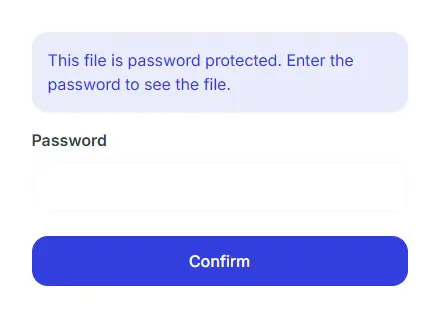
You can set passwords for the files you upload for security and privacy. Password-protected files can only be viewed by those who know the password. If a file has a password, anyone accessing the file page will be presented with a password screen.
Parameters
| Name | Value | Required |
|---|---|---|
| password.operation | password | yes |
| password.options.pass | string (length: 3-15) | yes |
Responses
| Status | Meaning | Description |
|---|---|---|
| 200 | Operation successful | - |
| 400 | Invalid request body | - |
| 429 | Too many requests | - |
| 500 | General error | All errors except 400 and 429 are displayed as 500 |
Password Protection
var data = new FormData();
data.append("file", fileInput.files[0], "[PROXY]");
data.append("password.operation", "password");
data.append("password.options.pass", "yourpassword");

var xhr = new XMLHttpRequest();
xhr.withCredentials = true;

xhr.addEventListener("readystatechange", function() {
  if(this.readyState === 4) {
    console.log(this.responseText);
  }
});

xhr.open("POST", "https://tinymedia.io/api/upload");
xhr.setRequestHeader("token", "XXXX-XXXX-XXXX-XXXX");

xhr.send(data);
Password Protection
POST /api/upload HTTP/1.1
Host: tinymedia.io
token: XXXX-XXXX-XXXX-XXXX
Content-Length: 418
Content-Type: multipart/form-data; boundary=----WebKitFormBoundary7MA4YWxkTrZu0gW

------WebKitFormBoundary7MA4YWxkTrZu0gW
Content-Disposition: form-data; name="file"; filename="[PROXY]"
Content-Type: <Content-Type header here>

(data)
------WebKitFormBoundary7MA4YWxkTrZu0gW
Content-Disposition: form-data; name="password.operation"

password
------WebKitFormBoundary7MA4YWxkTrZu0gW
Content-Disposition: form-data; name="password.options.pass"

yourpassword
------WebKitFormBoundary7MA4YWxkTrZu0gW--
Password Protection
curl -L 'https://tinymedia.io/api/upload' \
-H 'token: XXXX-XXXX-XXXX-XXXX' \
-F 'file=@"xu-qRFtHE/samplefile.jpg"' \
-F 'password.operation="password"' \
-F 'password.options.pass="yourpassword"'
Password Protection
require "uri"
require "net/http"

url = URI("https://tinymedia.io/api/upload")

https = Net::HTTP.new(url.host, url.port)
https.use_ssl = true

request = Net::HTTP::Post.new(url)
request["token"] = "XXXX-XXXX-XXXX-XXXX"
form_data = [['file', File.open('xu-qRFtHE/samplefile.jpg')],['password.operation', 'password'],['password.options.pass', 'yourpassword']]
request.set_form form_data, 'multipart/form-data'
response = https.request(request)
puts response.read_body
Password Protection
import http.client
import mimetypes
from codecs import encode

conn = http.client.HTTPSConnection("tinymedia.io")
dataList = []
boundary = 'wL36Yn8afVp8Ag7AmP8qZ0SA4n1v9T'
dataList.append(encode('--' + boundary))
dataList.append(encode('Content-Disposition: form-data; name=file; filename={0}'.format('')))

fileType = mimetypes.guess_type('xu-qRFtHE/samplefile.jpg')[0] or 'application/octet-stream'
dataList.append(encode('Content-Type: {}'.format(fileType)))
dataList.append(encode(''))

with open('xu-qRFtHE/samplefile.jpg', 'rb') as f:
  dataList.append(f.read())
dataList.append(encode('--' + boundary))
dataList.append(encode('Content-Disposition: form-data; name=password.operation;'))

dataList.append(encode('Content-Type: {}'.format('text/plain')))
dataList.append(encode(''))

dataList.append(encode("password"))
dataList.append(encode('--' + boundary))
dataList.append(encode('Content-Disposition: form-data; name=password.options.pass;'))

dataList.append(encode('Content-Type: {}'.format('text/plain')))
dataList.append(encode(''))

dataList.append(encode("yourpassword"))
dataList.append(encode('--'+boundary+'--'))
dataList.append(encode(''))
body = b'\r\n'.join(dataList)
payload = body
headers = {
  'token': 'XXXX-XXXX-XXXX-XXXX',
  'Content-type': 'multipart/form-data; boundary={}'.format(boundary)
}
conn.request("POST", "/api/upload", payload, headers)
res = conn.getresponse()
data = res.read()
print(data.decode("utf-8"))
Password Protection
<?php

$curl = curl_init();

curl_setopt_array($curl, array(
  CURLOPT_URL => 'https://tinymedia.io/api/upload',
  CURLOPT_RETURNTRANSFER => true,
  CURLOPT_ENCODING => '',
  CURLOPT_MAXREDIRS => 10,
  CURLOPT_TIMEOUT => 0,
  CURLOPT_FOLLOWLOCATION => true,
  CURLOPT_HTTP_VERSION => CURL_HTTP_VERSION_1_1,
  CURLOPT_CUSTOMREQUEST => 'POST',
  CURLOPT_POSTFIELDS => array('file'=> new CURLFILE('xu-qRFtHE/samplefile.jpg'),'password.operation' => 'password','password.options.pass' => 'yourpassword'),
  CURLOPT_HTTPHEADER => array(
    'token: XXXX-XXXX-XXXX-XXXX'
  ),
));

$response = curl_exec($curl);

curl_close($curl);
echo $response;
Password Protection
OkHttpClient client = new OkHttpClient().newBuilder()
  .build();
MediaType mediaType = MediaType.parse("text/plain");
RequestBody body = new MultipartBody.Builder().setType(MultipartBody.FORM)
  .addFormDataPart("file","",
    RequestBody.create(MediaType.parse("application/octet-stream"),
    new File("xu-qRFtHE/samplefile.jpg")))
  .addFormDataPart("password.operation","password")
  .addFormDataPart("password.options.pass","yourpassword")
  .build();
Request request = new Request.Builder()
  .url("https://tinymedia.io/api/upload")
  .method("POST", body)
  .addHeader("token", "XXXX-XXXX-XXXX-XXXX")
  .build();
Response response = client.newCall(request).execute();
Password Protection
package main

import (
  "fmt"
  "bytes"
  "mime/multipart"
  "os"
  "path/filepath"
  "net/http"
  "io"
)

func main() {

  url := "https://tinymedia.io/api/upload"
  method := "POST"

  payload := &bytes.Buffer{}
  writer := multipart.NewWriter(payload)
  file, errFile1 := os.Open("xu-qRFtHE/samplefile.jpg")
  defer file.Close()
  part1,
         errFile1 := writer.CreateFormFile("file",filepath.Base("xu-qRFtHE/samplefile.jpg"))
  _, errFile1 = io.Copy(part1, file)
  if errFile1 != nil {
    fmt.Println(errFile1)
    return
  }
  _ = writer.WriteField("password.operation", "password")
  _ = writer.WriteField("password.options.pass", "yourpassword")
  err := writer.Close()
  if err != nil {
    fmt.Println(err)
    return
  }


  client := &http.Client {
  }
  req, err := http.NewRequest(method, url, payload)

  if err != nil {
    fmt.Println(err)
    return
  }
  req.Header.Add("token", "XXXX-XXXX-XXXX-XXXX")

  req.Header.Set("Content-Type", writer.FormDataContentType())
  res, err := client.Do(req)
  if err != nil {
    fmt.Println(err)
    return
  }
  defer res.Body.Close()

  body, err := io.ReadAll(res.Body)
  if err != nil {
    fmt.Println(err)
    return
  }
  fmt.Println(string(body))
}
Password Protection
var client = new HttpClient();
var request = new HttpRequestMessage(HttpMethod.Post, "https://tinymedia.io/api/upload");
request.Headers.Add("token", "XXXX-XXXX-XXXX-XXXX");
var content = new MultipartFormDataContent();
content.Add(new StreamContent(File.OpenRead("xu-qRFtHE/samplefile.jpg")), "file", "xu-qRFtHE/samplefile.jpg");
content.Add(new StringContent("password"), "password.operation");
content.Add(new StringContent("yourpassword"), "password.options.pass");
request.Content = content;
var response = await client.SendAsync(request);
response.EnsureSuccessStatusCode();
Console.WriteLine(await response.Content.ReadAsStringAsync());
Convert
This process can be applied to video and image files.
With TinyMedia, you can convert image and video files to different formats.
Video files can be converted to the following formats: mp4,avi,wmv,webm,mkv,flv,mov,mp3,wav,flac,aac
Image files can be converted to the following formats: apng,avif,bmp,cur,dds,dib,eps,gif,hdr,heic,ico,jp2,jpe,jpeg,jpg,pdf,png,ppm,psd,raw,svg,tga,tiff,wbmp,webp
Convert Task
Parameters
| Name | Value | Required |
|---|---|---|
| convert.operation | convert | yes |
| convert.options.output | (?) | yes |
Responses
| Status | Meaning | Description |
|---|---|---|
| 200 | Operation successful | - |
| 400 | Invalid request body | - |
| 429 | Too many requests | - |
| 500 | General error | All errors except 400 and 429 are displayed as 500 |
Convert Task
var data = new FormData();
data.append("file", fileInput.files[0], "[PROXY]");
data.append("convert.operation", "convert");
data.append("convert.options.output", "png");

var xhr = new XMLHttpRequest();
xhr.withCredentials = true;

xhr.addEventListener("readystatechange", function() {
  if(this.readyState === 4) {
    console.log(this.responseText);
  }
});

xhr.open("POST", "https://tinymedia.io/api/upload");
xhr.setRequestHeader("token", "XXXX-XXXX-XXXX-XXXX");

xhr.send(data);
Convert Task
POST /api/upload HTTP/1.1
Host: tinymedia.io
token: XXXX-XXXX-XXXX-XXXX
Content-Length: 408
Content-Type: multipart/form-data; boundary=----WebKitFormBoundary7MA4YWxkTrZu0gW

------WebKitFormBoundary7MA4YWxkTrZu0gW
Content-Disposition: form-data; name="file"; filename="[PROXY]"
Content-Type: <Content-Type header here>

(data)
------WebKitFormBoundary7MA4YWxkTrZu0gW
Content-Disposition: form-data; name="convert.operation"

convert
------WebKitFormBoundary7MA4YWxkTrZu0gW
Content-Disposition: form-data; name="convert.options.output"

png
------WebKitFormBoundary7MA4YWxkTrZu0gW--
Convert Task
curl -L 'https://tinymedia.io/api/upload' \
-H 'token: XXXX-XXXX-XXXX-XXXX' \
-F 'file=@"xu-qRFtHE/samplefile.jpg"' \
-F 'convert.operation="convert"' \
-F 'convert.options.output="png"'
Convert Task
require "uri"
require "net/http"

url = URI("https://tinymedia.io/api/upload")

https = Net::HTTP.new(url.host, url.port)
https.use_ssl = true

request = Net::HTTP::Post.new(url)
request["token"] = "XXXX-XXXX-XXXX-XXXX"
form_data = [['file', File.open('xu-qRFtHE/samplefile.jpg')],['convert.operation', 'convert'],['convert.options.output', 'png']]
request.set_form form_data, 'multipart/form-data'
response = https.request(request)
puts response.read_body
Convert Task
import http.client
import mimetypes
from codecs import encode

conn = http.client.HTTPSConnection("tinymedia.io")
dataList = []
boundary = 'wL36Yn8afVp8Ag7AmP8qZ0SA4n1v9T'
dataList.append(encode('--' + boundary))
dataList.append(encode('Content-Disposition: form-data; name=file; filename={0}'.format('')))

fileType = mimetypes.guess_type('xu-qRFtHE/samplefile.jpg')[0] or 'application/octet-stream'
dataList.append(encode('Content-Type: {}'.format(fileType)))
dataList.append(encode(''))

with open('xu-qRFtHE/samplefile.jpg', 'rb') as f:
  dataList.append(f.read())
dataList.append(encode('--' + boundary))
dataList.append(encode('Content-Disposition: form-data; name=convert.operation;'))

dataList.append(encode('Content-Type: {}'.format('text/plain')))
dataList.append(encode(''))

dataList.append(encode("convert"))
dataList.append(encode('--' + boundary))
dataList.append(encode('Content-Disposition: form-data; name=convert.options.output;'))

dataList.append(encode('Content-Type: {}'.format('text/plain')))
dataList.append(encode(''))

dataList.append(encode("png"))
dataList.append(encode('--'+boundary+'--'))
dataList.append(encode(''))
body = b'\r\n'.join(dataList)
payload = body
headers = {
  'token': 'XXXX-XXXX-XXXX-XXXX',
  'Content-type': 'multipart/form-data; boundary={}'.format(boundary)
}
conn.request("POST", "/api/upload", payload, headers)
res = conn.getresponse()
data = res.read()
print(data.decode("utf-8"))
Convert Task
<?php

$curl = curl_init();

curl_setopt_array($curl, array(
  CURLOPT_URL => 'https://tinymedia.io/api/upload',
  CURLOPT_RETURNTRANSFER => true,
  CURLOPT_ENCODING => '',
  CURLOPT_MAXREDIRS => 10,
  CURLOPT_TIMEOUT => 0,
  CURLOPT_FOLLOWLOCATION => true,
  CURLOPT_HTTP_VERSION => CURL_HTTP_VERSION_1_1,
  CURLOPT_CUSTOMREQUEST => 'POST',
  CURLOPT_POSTFIELDS => array('file'=> new CURLFILE('xu-qRFtHE/samplefile.jpg'),'convert.operation' => 'convert','convert.options.output' => 'png'),
  CURLOPT_HTTPHEADER => array(
    'token: XXXX-XXXX-XXXX-XXXX'
  ),
));

$response = curl_exec($curl);

curl_close($curl);
echo $response;
Convert Task
OkHttpClient client = new OkHttpClient().newBuilder()
  .build();
MediaType mediaType = MediaType.parse("text/plain");
RequestBody body = new MultipartBody.Builder().setType(MultipartBody.FORM)
  .addFormDataPart("file","",
    RequestBody.create(MediaType.parse("application/octet-stream"),
    new File("xu-qRFtHE/samplefile.jpg")))
  .addFormDataPart("convert.operation","convert")
  .addFormDataPart("convert.options.output","png")
  .build();
Request request = new Request.Builder()
  .url("https://tinymedia.io/api/upload")
  .method("POST", body)
  .addHeader("token", "XXXX-XXXX-XXXX-XXXX")
  .build();
Response response = client.newCall(request).execute();
Convert Task
package main

import (
  "fmt"
  "bytes"
  "mime/multipart"
  "os"
  "path/filepath"
  "net/http"
  "io"
)

func main() {

  url := "https://tinymedia.io/api/upload"
  method := "POST"

  payload := &bytes.Buffer{}
  writer := multipart.NewWriter(payload)
  file, errFile1 := os.Open("xu-qRFtHE/samplefile.jpg")
  defer file.Close()
  part1,
         errFile1 := writer.CreateFormFile("file",filepath.Base("xu-qRFtHE/samplefile.jpg"))
  _, errFile1 = io.Copy(part1, file)
  if errFile1 != nil {
    fmt.Println(errFile1)
    return
  }
  _ = writer.WriteField("convert.operation", "convert")
  _ = writer.WriteField("convert.options.output", "png")
  err := writer.Close()
  if err != nil {
    fmt.Println(err)
    return
  }


  client := &http.Client {
  }
  req, err := http.NewRequest(method, url, payload)

  if err != nil {
    fmt.Println(err)
    return
  }
  req.Header.Add("token", "XXXX-XXXX-XXXX-XXXX")

  req.Header.Set("Content-Type", writer.FormDataContentType())
  res, err := client.Do(req)
  if err != nil {
    fmt.Println(err)
    return
  }
  defer res.Body.Close()

  body, err := io.ReadAll(res.Body)
  if err != nil {
    fmt.Println(err)
    return
  }
  fmt.Println(string(body))
}
Convert Task
var client = new HttpClient();
var request = new HttpRequestMessage(HttpMethod.Post, "https://tinymedia.io/api/upload");
request.Headers.Add("token", "XXXX-XXXX-XXXX-XXXX");
var content = new MultipartFormDataContent();
content.Add(new StreamContent(File.OpenRead("xu-qRFtHE/samplefile.jpg")), "file", "xu-qRFtHE/samplefile.jpg");
content.Add(new StringContent("convert"), "convert.operation");
content.Add(new StringContent("png"), "convert.options.output");
request.Content = content;
var response = await client.SendAsync(request);
response.EnsureSuccessStatusCode();
Console.WriteLine(await response.Content.ReadAsStringAsync());
Compress
This process can be applied to video and image files.
With TinyMedia, you can compress image and video files. Compression reduces file sizes. However, file quality will also decrease.
Files that are compressed too much can become corrupted to the point of being unusable. The compression ratio should be between 1 and 100.
Compress Task
Parameters
| Name | Value | Required |
|---|---|---|
| compress.operation | compress | yes |
| compress.options.rate | int (range: 1-100) | yes |
Responses
| Status | Meaning | Description |
|---|---|---|
| 200 | Operation successful | - |
| 400 | Invalid request body | - |
| 429 | Too many requests | - |
| 500 | General error | All errors except 400 and 429 are displayed as 500 |
Compress Task
var data = new FormData();
data.append("file", fileInput.files[0], "[PROXY]");
data.append("compress.operation", "compress");
data.append("compress.options.rate", "25");

var xhr = new XMLHttpRequest();
xhr.withCredentials = true;

xhr.addEventListener("readystatechange", function() {
  if(this.readyState === 4) {
    console.log(this.responseText);
  }
});

xhr.open("POST", "https://tinymedia.io/api/upload");
xhr.setRequestHeader("token", "XXXX-XXXX-XXXX-XXXX");

xhr.send(data);
Compress Task
POST /api/upload HTTP/1.1
Host: tinymedia.io
token: XXXX-XXXX-XXXX-XXXX
Content-Length: 408
Content-Type: multipart/form-data; boundary=----WebKitFormBoundary7MA4YWxkTrZu0gW

------WebKitFormBoundary7MA4YWxkTrZu0gW
Content-Disposition: form-data; name="file"; filename="[PROXY]"
Content-Type: <Content-Type header here>

(data)
------WebKitFormBoundary7MA4YWxkTrZu0gW
Content-Disposition: form-data; name="compress.operation"

compress
------WebKitFormBoundary7MA4YWxkTrZu0gW
Content-Disposition: form-data; name="compress.options.rate"

25
------WebKitFormBoundary7MA4YWxkTrZu0gW--
Compress Task
curl -L 'https://tinymedia.io/api/upload' \
-H 'token: XXXX-XXXX-XXXX-XXXX' \
-F 'file=@"xu-qRFtHE/samplefile.jpg"' \
-F 'compress.operation="compress"' \
-F 'compress.options.rate="25"'
Compress Task
require "uri"
require "net/http"

url = URI("https://tinymedia.io/api/upload")

https = Net::HTTP.new(url.host, url.port)
https.use_ssl = true

request = Net::HTTP::Post.new(url)
request["token"] = "XXXX-XXXX-XXXX-XXXX"
form_data = [['file', File.open('xu-qRFtHE/samplefile.jpg')],['compress.operation', 'compress'],['compress.options.rate', '25']]
request.set_form form_data, 'multipart/form-data'
response = https.request(request)
puts response.read_body
Compress Task
import http.client
import mimetypes
from codecs import encode

conn = http.client.HTTPSConnection("tinymedia.io")
dataList = []
boundary = 'wL36Yn8afVp8Ag7AmP8qZ0SA4n1v9T'
dataList.append(encode('--' + boundary))
dataList.append(encode('Content-Disposition: form-data; name=file; filename={0}'.format('')))

fileType = mimetypes.guess_type('xu-qRFtHE/samplefile.jpg')[0] or 'application/octet-stream'
dataList.append(encode('Content-Type: {}'.format(fileType)))
dataList.append(encode(''))

with open('xu-qRFtHE/samplefile.jpg', 'rb') as f:
  dataList.append(f.read())
dataList.append(encode('--' + boundary))
dataList.append(encode('Content-Disposition: form-data; name=compress.operation;'))

dataList.append(encode('Content-Type: {}'.format('text/plain')))
dataList.append(encode(''))

dataList.append(encode("compress"))
dataList.append(encode('--' + boundary))
dataList.append(encode('Content-Disposition: form-data; name=compress.options.rate;'))

dataList.append(encode('Content-Type: {}'.format('text/plain')))
dataList.append(encode(''))

dataList.append(encode("25"))
dataList.append(encode('--'+boundary+'--'))
dataList.append(encode(''))
body = b'\r\n'.join(dataList)
payload = body
headers = {
  'token': 'XXXX-XXXX-XXXX-XXXX',
  'Content-type': 'multipart/form-data; boundary={}'.format(boundary)
}
conn.request("POST", "/api/upload", payload, headers)
res = conn.getresponse()
data = res.read()
print(data.decode("utf-8"))
Compress Task
<?php

$curl = curl_init();

curl_setopt_array($curl, array(
  CURLOPT_URL => 'https://tinymedia.io/api/upload',
  CURLOPT_RETURNTRANSFER => true,
  CURLOPT_ENCODING => '',
  CURLOPT_MAXREDIRS => 10,
  CURLOPT_TIMEOUT => 0,
  CURLOPT_FOLLOWLOCATION => true,
  CURLOPT_HTTP_VERSION => CURL_HTTP_VERSION_1_1,
  CURLOPT_CUSTOMREQUEST => 'POST',
  CURLOPT_POSTFIELDS => array('file'=> new CURLFILE('xu-qRFtHE/samplefile.jpg'),'compress.operation' => 'compress','compress.options.rate' => '25'),
  CURLOPT_HTTPHEADER => array(
    'token: XXXX-XXXX-XXXX-XXXX'
  ),
));

$response = curl_exec($curl);

curl_close($curl);
echo $response;
Compress Task
OkHttpClient client = new OkHttpClient().newBuilder()
  .build();
MediaType mediaType = MediaType.parse("text/plain");
RequestBody body = new MultipartBody.Builder().setType(MultipartBody.FORM)
  .addFormDataPart("file","",
    RequestBody.create(MediaType.parse("application/octet-stream"),
    new File("xu-qRFtHE/samplefile.jpg")))
  .addFormDataPart("compress.operation","compress")
  .addFormDataPart("compress.options.rate","25")
  .build();
Request request = new Request.Builder()
  .url("https://tinymedia.io/api/upload")
  .method("POST", body)
  .addHeader("token", "XXXX-XXXX-XXXX-XXXX")
  .build();
Response response = client.newCall(request).execute();
Compress Task
package main

import (
  "fmt"
  "bytes"
  "mime/multipart"
  "os"
  "path/filepath"
  "net/http"
  "io"
)

func main() {

  url := "https://tinymedia.io/api/upload"
  method := "POST"

  payload := &bytes.Buffer{}
  writer := multipart.NewWriter(payload)
  file, errFile1 := os.Open("xu-qRFtHE/samplefile.jpg")
  defer file.Close()
  part1,
         errFile1 := writer.CreateFormFile("file",filepath.Base("xu-qRFtHE/samplefile.jpg"))
  _, errFile1 = io.Copy(part1, file)
  if errFile1 != nil {
    fmt.Println(errFile1)
    return
  }
  _ = writer.WriteField("compress.operation", "compress")
  _ = writer.WriteField("compress.options.rate", "25")
  err := writer.Close()
  if err != nil {
    fmt.Println(err)
    return
  }


  client := &http.Client {
  }
  req, err := http.NewRequest(method, url, payload)

  if err != nil {
    fmt.Println(err)
    return
  }
  req.Header.Add("token", "XXXX-XXXX-XXXX-XXXX")

  req.Header.Set("Content-Type", writer.FormDataContentType())
  res, err := client.Do(req)
  if err != nil {
    fmt.Println(err)
    return
  }
  defer res.Body.Close()

  body, err := io.ReadAll(res.Body)
  if err != nil {
    fmt.Println(err)
    return
  }
  fmt.Println(string(body))
}
Compress Task
var client = new HttpClient();
var request = new HttpRequestMessage(HttpMethod.Post, "https://tinymedia.io/api/upload");
request.Headers.Add("token", "XXXX-XXXX-XXXX-XXXX");
var content = new MultipartFormDataContent();
content.Add(new StreamContent(File.OpenRead("xu-qRFtHE/samplefile.jpg")), "file", "xu-qRFtHE/samplefile.jpg");
content.Add(new StringContent("compress"), "compress.operation");
content.Add(new StringContent("25"), "compress.options.rate");
request.Content = content;
var response = await client.SendAsync(request);
response.EnsureSuccessStatusCode();
Console.WriteLine(await response.Content.ReadAsStringAsync());
Resize
This process can be applied to video and image files.
TinyMedia lets you resize image and video files. By "size," we mean width and height. When resizing, only the width and height are changed; the image or video is not cropped.
Resize Task
Parameters
| Name | Value | Required |
|---|---|---|
| size.operation | size | yes |
| size.options.width | int (range: 1-3840) | no |
| size.options.height | int (range: 1-2160) | no |
Responses
| Status | Meaning | Description |
|---|---|---|
| 200 | Operation successful | - |
| 400 | Invalid request body | - |
| 429 | Too many requests | - |
| 500 | General error | All errors except 400 and 429 are displayed as 500 |
Resize Task
var data = new FormData();
data.append("file", fileInput.files[0], "[PROXY]");
data.append("size.operation", "size");
data.append("size.options.width", "600");
data.append("size.options.height", "400");

var xhr = new XMLHttpRequest();
xhr.withCredentials = true;

xhr.addEventListener("readystatechange", function() {
  if(this.readyState === 4) {
    console.log(this.responseText);
  }
});

xhr.open("POST", "https://tinymedia.io/api/upload");
xhr.setRequestHeader("token", "XXXX-XXXX-XXXX-XXXX");

xhr.send(data);
Resize Task
POST /api/upload HTTP/1.1
Host: tinymedia.io
token: XXXX-XXXX-XXXX-XXXX
Content-Length: 502
Content-Type: multipart/form-data; boundary=----WebKitFormBoundary7MA4YWxkTrZu0gW

------WebKitFormBoundary7MA4YWxkTrZu0gW
Content-Disposition: form-data; name="file"; filename="[PROXY]"
Content-Type: <Content-Type header here>

(data)
------WebKitFormBoundary7MA4YWxkTrZu0gW
Content-Disposition: form-data; name="size.operation"

size
------WebKitFormBoundary7MA4YWxkTrZu0gW
Content-Disposition: form-data; name="size.options.width"

600
------WebKitFormBoundary7MA4YWxkTrZu0gW
Content-Disposition: form-data; name="size.options.height"

400
------WebKitFormBoundary7MA4YWxkTrZu0gW--
Resize Task
curl -L 'https://tinymedia.io/api/upload' \
-H 'token: XXXX-XXXX-XXXX-XXXX' \
-F 'file=@"xu-qRFtHE/samplefile.jpg"' \
-F 'size.operation="size"' \
-F 'size.options.width="600"' \
-F 'size.options.height="400"'
Resize Task
require "uri"
require "net/http"

url = URI("https://tinymedia.io/api/upload")

https = Net::HTTP.new(url.host, url.port)
https.use_ssl = true

request = Net::HTTP::Post.new(url)
request["token"] = "XXXX-XXXX-XXXX-XXXX"
form_data = [['file', File.open('xu-qRFtHE/samplefile.jpg')],['size.operation', 'size'],['size.options.width', '600'],['size.options.height', '400']]
request.set_form form_data, 'multipart/form-data'
response = https.request(request)
puts response.read_body
Resize Task
import http.client
import mimetypes
from codecs import encode

conn = http.client.HTTPSConnection("tinymedia.io")
dataList = []
boundary = 'wL36Yn8afVp8Ag7AmP8qZ0SA4n1v9T'
dataList.append(encode('--' + boundary))
dataList.append(encode('Content-Disposition: form-data; name=file; filename={0}'.format('')))

fileType = mimetypes.guess_type('xu-qRFtHE/samplefile.jpg')[0] or 'application/octet-stream'
dataList.append(encode('Content-Type: {}'.format(fileType)))
dataList.append(encode(''))

with open('xu-qRFtHE/samplefile.jpg', 'rb') as f:
  dataList.append(f.read())
dataList.append(encode('--' + boundary))
dataList.append(encode('Content-Disposition: form-data; name=size.operation;'))

dataList.append(encode('Content-Type: {}'.format('text/plain')))
dataList.append(encode(''))

dataList.append(encode("size"))
dataList.append(encode('--' + boundary))
dataList.append(encode('Content-Disposition: form-data; name=size.options.width;'))

dataList.append(encode('Content-Type: {}'.format('text/plain')))
dataList.append(encode(''))

dataList.append(encode("600"))
dataList.append(encode('--' + boundary))
dataList.append(encode('Content-Disposition: form-data; name=size.options.height;'))

dataList.append(encode('Content-Type: {}'.format('text/plain')))
dataList.append(encode(''))

dataList.append(encode("400"))
dataList.append(encode('--'+boundary+'--'))
dataList.append(encode(''))
body = b'\r\n'.join(dataList)
payload = body
headers = {
  'token': 'XXXX-XXXX-XXXX-XXXX',
  'Content-type': 'multipart/form-data; boundary={}'.format(boundary)
}
conn.request("POST", "/api/upload", payload, headers)
res = conn.getresponse()
data = res.read()
print(data.decode("utf-8"))
Resize Task
<?php

$curl = curl_init();

curl_setopt_array($curl, array(
  CURLOPT_URL => 'https://tinymedia.io/api/upload',
  CURLOPT_RETURNTRANSFER => true,
  CURLOPT_ENCODING => '',
  CURLOPT_MAXREDIRS => 10,
  CURLOPT_TIMEOUT => 0,
  CURLOPT_FOLLOWLOCATION => true,
  CURLOPT_HTTP_VERSION => CURL_HTTP_VERSION_1_1,
  CURLOPT_CUSTOMREQUEST => 'POST',
  CURLOPT_POSTFIELDS => array('file'=> new CURLFILE('xu-qRFtHE/samplefile.jpg'),'size.operation' => 'size','size.options.width' => '600','size.options.height' => '400'),
  CURLOPT_HTTPHEADER => array(
    'token: XXXX-XXXX-XXXX-XXXX'
  ),
));

$response = curl_exec($curl);

curl_close($curl);
echo $response;
Resize Task
OkHttpClient client = new OkHttpClient().newBuilder()
  .build();
MediaType mediaType = MediaType.parse("text/plain");
RequestBody body = new MultipartBody.Builder().setType(MultipartBody.FORM)
  .addFormDataPart("file","",
    RequestBody.create(MediaType.parse("application/octet-stream"),
    new File("xu-qRFtHE/samplefile.jpg")))
  .addFormDataPart("size.operation","size")
  .addFormDataPart("size.options.width","600")
  .addFormDataPart("size.options.height","400")
  .build();
Request request = new Request.Builder()
  .url("https://tinymedia.io/api/upload")
  .method("POST", body)
  .addHeader("token", "XXXX-XXXX-XXXX-XXXX")
  .build();
Response response = client.newCall(request).execute();
Resize Task
package main

import (
  "fmt"
  "bytes"
  "mime/multipart"
  "os"
  "path/filepath"
  "net/http"
  "io"
)

func main() {

  url := "https://tinymedia.io/api/upload"
  method := "POST"

  payload := &bytes.Buffer{}
  writer := multipart.NewWriter(payload)
  file, errFile1 := os.Open("xu-qRFtHE/samplefile.jpg")
  defer file.Close()
  part1,
         errFile1 := writer.CreateFormFile("file",filepath.Base("xu-qRFtHE/samplefile.jpg"))
  _, errFile1 = io.Copy(part1, file)
  if errFile1 != nil {
    fmt.Println(errFile1)
    return
  }
  _ = writer.WriteField("size.operation", "size")
  _ = writer.WriteField("size.options.width", "600")
  _ = writer.WriteField("size.options.height", "400")
  err := writer.Close()
  if err != nil {
    fmt.Println(err)
    return
  }


  client := &http.Client {
  }
  req, err := http.NewRequest(method, url, payload)

  if err != nil {
    fmt.Println(err)
    return
  }
  req.Header.Add("token", "XXXX-XXXX-XXXX-XXXX")

  req.Header.Set("Content-Type", writer.FormDataContentType())
  res, err := client.Do(req)
  if err != nil {
    fmt.Println(err)
    return
  }
  defer res.Body.Close()

  body, err := io.ReadAll(res.Body)
  if err != nil {
    fmt.Println(err)
    return
  }
  fmt.Println(string(body))
}
Resize Task
var client = new HttpClient();
var request = new HttpRequestMessage(HttpMethod.Post, "https://tinymedia.io/api/upload");
request.Headers.Add("token", "XXXX-XXXX-XXXX-XXXX");
var content = new MultipartFormDataContent();
content.Add(new StreamContent(File.OpenRead("xu-qRFtHE/samplefile.jpg")), "file", "xu-qRFtHE/samplefile.jpg");
content.Add(new StringContent("size"), "size.operation");
content.Add(new StringContent("600"), "size.options.width");
content.Add(new StringContent("400"), "size.options.height");
request.Content = content;
var response = await client.SendAsync(request);
response.EnsureSuccessStatusCode();
Console.WriteLine(await response.Content.ReadAsStringAsync());
Clip
This process can be applied to video files.
TinyMedia allows you to cut video files. This process can be used to extract a specific portion of a video. The start and end times of the desired video section must be specified.
The section to be trimmed must be shorter than the main video. The start and end times should be in the following format: hh:mm:ss
Clip Task
Parameters
| Name | Value | Required |
|---|---|---|
| clip.operation | clip | yes |
| clip.options.start | hh:mm:ss | no |
| clip.options.end | hh:mm:ss | no |
Responses
| Status | Meaning | Description |
|---|---|---|
| 200 | Operation successful | - |
| 400 | Invalid request body | - |
| 429 | Too many requests | - |
| 500 | General error | All errors except 400 and 429 are displayed as 500 |
Clip Task
var data = new FormData();
data.append("file", fileInput.files[0], "[PROXY]");
data.append("clip.operation", "clip");
data.append("clip.options.start", "00:01:25");
data.append("clip.options.end", "00:03:45");

var xhr = new XMLHttpRequest();
xhr.withCredentials = true;

xhr.addEventListener("readystatechange", function() {
  if(this.readyState === 4) {
    console.log(this.responseText);
  }
});

xhr.open("POST", "https://tinymedia.io/api/upload");
xhr.setRequestHeader("token", "XXXX-XXXX-XXXX-XXXX");

xhr.send(data);
Clip Task
POST /api/upload HTTP/1.1
Host: tinymedia.io
token: XXXX-XXXX-XXXX-XXXX
Content-Length: 509
Content-Type: multipart/form-data; boundary=----WebKitFormBoundary7MA4YWxkTrZu0gW

------WebKitFormBoundary7MA4YWxkTrZu0gW
Content-Disposition: form-data; name="file"; filename="[PROXY]"
Content-Type: <Content-Type header here>

(data)
------WebKitFormBoundary7MA4YWxkTrZu0gW
Content-Disposition: form-data; name="clip.operation"

clip
------WebKitFormBoundary7MA4YWxkTrZu0gW
Content-Disposition: form-data; name="clip.options.start"

00:01:25
------WebKitFormBoundary7MA4YWxkTrZu0gW
Content-Disposition: form-data; name="clip.options.end"

00:03:45
------WebKitFormBoundary7MA4YWxkTrZu0gW--
Clip Task
curl -L 'https://tinymedia.io/api/upload' \
-H 'token: XXXX-XXXX-XXXX-XXXX' \
-F 'file=@"v7XJiJhEC/samplefile.mp4"' \
-F 'clip.operation="clip"' \
-F 'clip.options.start="00:01:25"' \
-F 'clip.options.end="00:03:45"'
Clip Task
require "uri"
require "net/http"

url = URI("https://tinymedia.io/api/upload")

https = Net::HTTP.new(url.host, url.port)
https.use_ssl = true

request = Net::HTTP::Post.new(url)
request["token"] = "XXXX-XXXX-XXXX-XXXX"
form_data = [['file', File.open('v7XJiJhEC/samplefile.mp4')],['clip.operation', 'clip'],['clip.options.start', '00:01:25'],['clip.options.end', '00:03:45']]
request.set_form form_data, 'multipart/form-data'
response = https.request(request)
puts response.read_body
Clip Task
import http.client
import mimetypes
from codecs import encode

conn = http.client.HTTPSConnection("tinymedia.io")
dataList = []
boundary = 'wL36Yn8afVp8Ag7AmP8qZ0SA4n1v9T'
dataList.append(encode('--' + boundary))
dataList.append(encode('Content-Disposition: form-data; name=file; filename={0}'.format('')))

fileType = mimetypes.guess_type('v7XJiJhEC/samplefile.mp4')[0] or 'application/octet-stream'
dataList.append(encode('Content-Type: {}'.format(fileType)))
dataList.append(encode(''))

with open('v7XJiJhEC/samplefile.mp4', 'rb') as f:
  dataList.append(f.read())
dataList.append(encode('--' + boundary))
dataList.append(encode('Content-Disposition: form-data; name=clip.operation;'))

dataList.append(encode('Content-Type: {}'.format('text/plain')))
dataList.append(encode(''))

dataList.append(encode("clip"))
dataList.append(encode('--' + boundary))
dataList.append(encode('Content-Disposition: form-data; name=clip.options.start;'))

dataList.append(encode('Content-Type: {}'.format('text/plain')))
dataList.append(encode(''))

dataList.append(encode("00:01:25"))
dataList.append(encode('--' + boundary))
dataList.append(encode('Content-Disposition: form-data; name=clip.options.end;'))

dataList.append(encode('Content-Type: {}'.format('text/plain')))
dataList.append(encode(''))

dataList.append(encode("00:03:45"))
dataList.append(encode('--'+boundary+'--'))
dataList.append(encode(''))
body = b'\r\n'.join(dataList)
payload = body
headers = {
  'token': 'XXXX-XXXX-XXXX-XXXX',
  'Content-type': 'multipart/form-data; boundary={}'.format(boundary)
}
conn.request("POST", "/api/upload", payload, headers)
res = conn.getresponse()
data = res.read()
print(data.decode("utf-8"))
Clip Task
<?php

$curl = curl_init();

curl_setopt_array($curl, array(
  CURLOPT_URL => 'https://tinymedia.io/api/upload',
  CURLOPT_RETURNTRANSFER => true,
  CURLOPT_ENCODING => '',
  CURLOPT_MAXREDIRS => 10,
  CURLOPT_TIMEOUT => 0,
  CURLOPT_FOLLOWLOCATION => true,
  CURLOPT_HTTP_VERSION => CURL_HTTP_VERSION_1_1,
  CURLOPT_CUSTOMREQUEST => 'POST',
  CURLOPT_POSTFIELDS => array('file'=> new CURLFILE('v7XJiJhEC/samplefile.mp4'),'clip.operation' => 'clip','clip.options.start' => '00:01:25','clip.options.end' => '00:03:45'),
  CURLOPT_HTTPHEADER => array(
    'token: XXXX-XXXX-XXXX-XXXX'
  ),
));

$response = curl_exec($curl);

curl_close($curl);
echo $response;
Clip Task
OkHttpClient client = new OkHttpClient().newBuilder()
  .build();
MediaType mediaType = MediaType.parse("text/plain");
RequestBody body = new MultipartBody.Builder().setType(MultipartBody.FORM)
  .addFormDataPart("file","",
    RequestBody.create(MediaType.parse("application/octet-stream"),
    new File("v7XJiJhEC/samplefile.mp4")))
  .addFormDataPart("clip.operation","clip")
  .addFormDataPart("clip.options.start","00:01:25")
  .addFormDataPart("clip.options.end","00:03:45")
  .build();
Request request = new Request.Builder()
  .url("https://tinymedia.io/api/upload")
  .method("POST", body)
  .addHeader("token", "XXXX-XXXX-XXXX-XXXX")
  .build();
Response response = client.newCall(request).execute();
Clip Task
package main

import (
  "fmt"
  "bytes"
  "mime/multipart"
  "os"
  "path/filepath"
  "net/http"
  "io"
)

func main() {

  url := "https://tinymedia.io/api/upload"
  method := "POST"

  payload := &bytes.Buffer{}
  writer := multipart.NewWriter(payload)
  file, errFile1 := os.Open("v7XJiJhEC/samplefile.mp4")
  defer file.Close()
  part1,
         errFile1 := writer.CreateFormFile("file",filepath.Base("v7XJiJhEC/samplefile.mp4"))
  _, errFile1 = io.Copy(part1, file)
  if errFile1 != nil {
    fmt.Println(errFile1)
    return
  }
  _ = writer.WriteField("clip.operation", "clip")
  _ = writer.WriteField("clip.options.start", "00:01:25")
  _ = writer.WriteField("clip.options.end", "00:03:45")
  err := writer.Close()
  if err != nil {
    fmt.Println(err)
    return
  }


  client := &http.Client {
  }
  req, err := http.NewRequest(method, url, payload)

  if err != nil {
    fmt.Println(err)
    return
  }
  req.Header.Add("token", "XXXX-XXXX-XXXX-XXXX")

  req.Header.Set("Content-Type", writer.FormDataContentType())
  res, err := client.Do(req)
  if err != nil {
    fmt.Println(err)
    return
  }
  defer res.Body.Close()

  body, err := io.ReadAll(res.Body)
  if err != nil {
    fmt.Println(err)
    return
  }
  fmt.Println(string(body))
}
Clip Task
var client = new HttpClient();
var request = new HttpRequestMessage(HttpMethod.Post, "https://tinymedia.io/api/upload");
request.Headers.Add("token", "XXXX-XXXX-XXXX-XXXX");
var content = new MultipartFormDataContent();
content.Add(new StreamContent(File.OpenRead("v7XJiJhEC/samplefile.mp4")), "file", "v7XJiJhEC/samplefile.mp4");
content.Add(new StringContent("clip"), "clip.operation");
content.Add(new StringContent("00:01:25"), "clip.options.start");
content.Add(new StringContent("00:03:45"), "clip.options.end");
request.Content = content;
var response = await client.SendAsync(request);
response.EnsureSuccessStatusCode();
Console.WriteLine(await response.Content.ReadAsStringAsync());
Rotation
This process can be applied to video files.
TinyMedia allows you to rotate videos at specific angles. These angles are 90, 180, and 270 degrees.
Rotation Task
Parameters
| Name | Value | Required |
|---|---|---|
| rotation.operation | rotation | yes |
| rotation.options.angle | 90,180,270 | yes |
Responses
| Status | Meaning | Description |
|---|---|---|
| 200 | Operation successful | - |
| 400 | Invalid request body | - |
| 429 | Too many requests | - |
| 500 | General error | All errors except 400 and 429 are displayed as 500 |
Rotation Task
var data = new FormData();
data.append("file", fileInput.files[0], "[PROXY]");
data.append("rotation.operation", "rotation");
data.append("rotation.options.angle", "270");

var xhr = new XMLHttpRequest();
xhr.withCredentials = true;

xhr.addEventListener("readystatechange", function() {
  if(this.readyState === 4) {
    console.log(this.responseText);
  }
});

xhr.open("POST", "https://tinymedia.io/api/upload");
xhr.setRequestHeader("token", "XXXX-XXXX-XXXX-XXXX");

xhr.send(data);
Rotation Task
POST /api/upload HTTP/1.1
Host: tinymedia.io
token: XXXX-XXXX-XXXX-XXXX
Content-Length: 410
Content-Type: multipart/form-data; boundary=----WebKitFormBoundary7MA4YWxkTrZu0gW

------WebKitFormBoundary7MA4YWxkTrZu0gW
Content-Disposition: form-data; name="file"; filename="[PROXY]"
Content-Type: <Content-Type header here>

(data)
------WebKitFormBoundary7MA4YWxkTrZu0gW
Content-Disposition: form-data; name="rotation.operation"

rotation
------WebKitFormBoundary7MA4YWxkTrZu0gW
Content-Disposition: form-data; name="rotation.options.angle"

270
------WebKitFormBoundary7MA4YWxkTrZu0gW--
Rotation Task
curl -L 'https://tinymedia.io/api/upload' \
-H 'token: XXXX-XXXX-XXXX-XXXX' \
-F 'file=@"v7XJiJhEC/samplefile.mp4"' \
-F 'rotation.operation="rotation"' \
-F 'rotation.options.angle="270"'
Rotation Task
require "uri"
require "net/http"

url = URI("https://tinymedia.io/api/upload")

https = Net::HTTP.new(url.host, url.port)
https.use_ssl = true

request = Net::HTTP::Post.new(url)
request["token"] = "XXXX-XXXX-XXXX-XXXX"
form_data = [['file', File.open('v7XJiJhEC/samplefile.mp4')],['rotation.operation', 'rotation'],['rotation.options.angle', '270']]
request.set_form form_data, 'multipart/form-data'
response = https.request(request)
puts response.read_body
Rotation Task
import http.client
import mimetypes
from codecs import encode

conn = http.client.HTTPSConnection("tinymedia.io")
dataList = []
boundary = 'wL36Yn8afVp8Ag7AmP8qZ0SA4n1v9T'
dataList.append(encode('--' + boundary))
dataList.append(encode('Content-Disposition: form-data; name=file; filename={0}'.format('')))

fileType = mimetypes.guess_type('v7XJiJhEC/samplefile.mp4')[0] or 'application/octet-stream'
dataList.append(encode('Content-Type: {}'.format(fileType)))
dataList.append(encode(''))

with open('v7XJiJhEC/samplefile.mp4', 'rb') as f:
  dataList.append(f.read())
dataList.append(encode('--' + boundary))
dataList.append(encode('Content-Disposition: form-data; name=rotation.operation;'))

dataList.append(encode('Content-Type: {}'.format('text/plain')))
dataList.append(encode(''))

dataList.append(encode("rotation"))
dataList.append(encode('--' + boundary))
dataList.append(encode('Content-Disposition: form-data; name=rotation.options.angle;'))

dataList.append(encode('Content-Type: {}'.format('text/plain')))
dataList.append(encode(''))

dataList.append(encode("270"))
dataList.append(encode('--'+boundary+'--'))
dataList.append(encode(''))
body = b'\r\n'.join(dataList)
payload = body
headers = {
  'token': 'XXXX-XXXX-XXXX-XXXX',
  'Content-type': 'multipart/form-data; boundary={}'.format(boundary)
}
conn.request("POST", "/api/upload", payload, headers)
res = conn.getresponse()
data = res.read()
print(data.decode("utf-8"))
Rotation Task
<?php

$curl = curl_init();

curl_setopt_array($curl, array(
  CURLOPT_URL => 'https://tinymedia.io/api/upload',
  CURLOPT_RETURNTRANSFER => true,
  CURLOPT_ENCODING => '',
  CURLOPT_MAXREDIRS => 10,
  CURLOPT_TIMEOUT => 0,
  CURLOPT_FOLLOWLOCATION => true,
  CURLOPT_HTTP_VERSION => CURL_HTTP_VERSION_1_1,
  CURLOPT_CUSTOMREQUEST => 'POST',
  CURLOPT_POSTFIELDS => array('file'=> new CURLFILE('v7XJiJhEC/samplefile.mp4'),'rotation.operation' => 'rotation','rotation.options.angle' => '270'),
  CURLOPT_HTTPHEADER => array(
    'token: XXXX-XXXX-XXXX-XXXX'
  ),
));

$response = curl_exec($curl);

curl_close($curl);
echo $response;
Rotation Task
OkHttpClient client = new OkHttpClient().newBuilder()
  .build();
MediaType mediaType = MediaType.parse("text/plain");
RequestBody body = new MultipartBody.Builder().setType(MultipartBody.FORM)
  .addFormDataPart("file","",
    RequestBody.create(MediaType.parse("application/octet-stream"),
    new File("v7XJiJhEC/samplefile.mp4")))
  .addFormDataPart("rotation.operation","rotation")
  .addFormDataPart("rotation.options.angle","270")
  .build();
Request request = new Request.Builder()
  .url("https://tinymedia.io/api/upload")
  .method("POST", body)
  .addHeader("token", "XXXX-XXXX-XXXX-XXXX")
  .build();
Response response = client.newCall(request).execute();
Rotation Task
package main

import (
  "fmt"
  "bytes"
  "mime/multipart"
  "os"
  "path/filepath"
  "net/http"
  "io"
)

func main() {

  url := "https://tinymedia.io/api/upload"
  method := "POST"

  payload := &bytes.Buffer{}
  writer := multipart.NewWriter(payload)
  file, errFile1 := os.Open("v7XJiJhEC/samplefile.mp4")
  defer file.Close()
  part1,
         errFile1 := writer.CreateFormFile("file",filepath.Base("v7XJiJhEC/samplefile.mp4"))
  _, errFile1 = io.Copy(part1, file)
  if errFile1 != nil {
    fmt.Println(errFile1)
    return
  }
  _ = writer.WriteField("rotation.operation", "rotation")
  _ = writer.WriteField("rotation.options.angle", "270")
  err := writer.Close()
  if err != nil {
    fmt.Println(err)
    return
  }


  client := &http.Client {
  }
  req, err := http.NewRequest(method, url, payload)

  if err != nil {
    fmt.Println(err)
    return
  }
  req.Header.Add("token", "XXXX-XXXX-XXXX-XXXX")

  req.Header.Set("Content-Type", writer.FormDataContentType())
  res, err := client.Do(req)
  if err != nil {
    fmt.Println(err)
    return
  }
  defer res.Body.Close()

  body, err := io.ReadAll(res.Body)
  if err != nil {
    fmt.Println(err)
    return
  }
  fmt.Println(string(body))
}
Rotation Task
var client = new HttpClient();
var request = new HttpRequestMessage(HttpMethod.Post, "https://tinymedia.io/api/upload");
request.Headers.Add("token", "XXXX-XXXX-XXXX-XXXX");
var content = new MultipartFormDataContent();
content.Add(new StreamContent(File.OpenRead("v7XJiJhEC/samplefile.mp4")), "file", "v7XJiJhEC/samplefile.mp4");
content.Add(new StringContent("rotation"), "rotation.operation");
content.Add(new StringContent("270"), "rotation.options.angle");
request.Content = content;
var response = await client.SendAsync(request);
response.EnsureSuccessStatusCode();
Console.WriteLine(await response.Content.ReadAsStringAsync());
Rotation & Reflect
This process can be applied to image files.
With TinyMedia, you can rotate images at specific angles and reflect them in various ways.
Options for rotating the image: rotate-l-90,rotate-l-180,rotate-l-270,rotate-r-90,rotate-r-180,rotate-r-270
Options for reflecting the image: reflect-h,reflect-v
Rotation & Reflect Task
Parameters
| Name | Value | Required |
|---|---|---|
| rotation-reflect.operation | rotation-reflect | yes |
| rotation-reflect.options.type | (?) | yes |
Responses
| Status | Meaning | Description |
|---|---|---|
| 200 | Operation successful | - |
| 400 | Invalid request body | - |
| 429 | Too many requests | - |
| 500 | General error | All errors except 400 and 429 are displayed as 500 |
Rotation & Reflect Task
var data = new FormData();
data.append("file", fileInput.files[0], "[PROXY]");
data.append("rotation-reflect.operation", "rotation-reflect");
data.append("rotation-reflect.options.type", "rotate-l-90");

var xhr = new XMLHttpRequest();
xhr.withCredentials = true;

xhr.addEventListener("readystatechange", function() {
  if(this.readyState === 4) {
    console.log(this.responseText);
  }
});

xhr.open("POST", "https://tinymedia.io/api/upload");
xhr.setRequestHeader("token", "XXXX-XXXX-XXXX-XXXX");

xhr.send(data);
Rotation & Reflect Task
POST /api/upload HTTP/1.1
Host: tinymedia.io
token: XXXX-XXXX-XXXX-XXXX
Content-Length: 441
Content-Type: multipart/form-data; boundary=----WebKitFormBoundary7MA4YWxkTrZu0gW

------WebKitFormBoundary7MA4YWxkTrZu0gW
Content-Disposition: form-data; name="file"; filename="[PROXY]"
Content-Type: <Content-Type header here>

(data)
------WebKitFormBoundary7MA4YWxkTrZu0gW
Content-Disposition: form-data; name="rotation-reflect.operation"

rotation-reflect
------WebKitFormBoundary7MA4YWxkTrZu0gW
Content-Disposition: form-data; name="rotation-reflect.options.type"

rotate-l-90
------WebKitFormBoundary7MA4YWxkTrZu0gW--
Rotation & Reflect Task
curl -L 'https://tinymedia.io/api/upload' \
-H 'token: XXXX-XXXX-XXXX-XXXX' \
-F 'file=@"pLbtctcbf/samplefile.jpg"' \
-F 'rotation-reflect.operation="rotation-reflect"' \
-F 'rotation-reflect.options.type="rotate-l-90"'
Rotation & Reflect Task
require "uri"
require "net/http"

url = URI("https://tinymedia.io/api/upload")

https = Net::HTTP.new(url.host, url.port)
https.use_ssl = true

request = Net::HTTP::Post.new(url)
request["token"] = "XXXX-XXXX-XXXX-XXXX"
form_data = [['file', File.open('pLbtctcbf/samplefile.jpg')],['rotation-reflect.operation', 'rotation-reflect'],['rotation-reflect.options.type', 'rotate-l-90']]
request.set_form form_data, 'multipart/form-data'
response = https.request(request)
puts response.read_body
Rotation & Reflect Task
import http.client
import mimetypes
from codecs import encode

conn = http.client.HTTPSConnection("tinymedia.io")
dataList = []
boundary = 'wL36Yn8afVp8Ag7AmP8qZ0SA4n1v9T'
dataList.append(encode('--' + boundary))
dataList.append(encode('Content-Disposition: form-data; name=file; filename={0}'.format('')))

fileType = mimetypes.guess_type('pLbtctcbf/samplefile.jpg')[0] or 'application/octet-stream'
dataList.append(encode('Content-Type: {}'.format(fileType)))
dataList.append(encode(''))

with open('pLbtctcbf/samplefile.jpg', 'rb') as f:
  dataList.append(f.read())
dataList.append(encode('--' + boundary))
dataList.append(encode('Content-Disposition: form-data; name=rotation-reflect.operation;'))

dataList.append(encode('Content-Type: {}'.format('text/plain')))
dataList.append(encode(''))

dataList.append(encode("rotation-reflect"))
dataList.append(encode('--' + boundary))
dataList.append(encode('Content-Disposition: form-data; name=rotation-reflect.options.type;'))

dataList.append(encode('Content-Type: {}'.format('text/plain')))
dataList.append(encode(''))

dataList.append(encode("rotate-l-90"))
dataList.append(encode('--'+boundary+'--'))
dataList.append(encode(''))
body = b'\r\n'.join(dataList)
payload = body
headers = {
  'token': 'XXXX-XXXX-XXXX-XXXX',
  'Content-type': 'multipart/form-data; boundary={}'.format(boundary)
}
conn.request("POST", "/api/upload", payload, headers)
res = conn.getresponse()
data = res.read()
print(data.decode("utf-8"))
Rotation & Reflect Task
<?php

$curl = curl_init();

curl_setopt_array($curl, array(
  CURLOPT_URL => 'https://tinymedia.io/api/upload',
  CURLOPT_RETURNTRANSFER => true,
  CURLOPT_ENCODING => '',
  CURLOPT_MAXREDIRS => 10,
  CURLOPT_TIMEOUT => 0,
  CURLOPT_FOLLOWLOCATION => true,
  CURLOPT_HTTP_VERSION => CURL_HTTP_VERSION_1_1,
  CURLOPT_CUSTOMREQUEST => 'POST',
  CURLOPT_POSTFIELDS => array('file'=> new CURLFILE('pLbtctcbf/samplefile.jpg'),'rotation-reflect.operation' => 'rotation-reflect','rotation-reflect.options.type' => 'rotate-l-90'),
  CURLOPT_HTTPHEADER => array(
    'token: XXXX-XXXX-XXXX-XXXX'
  ),
));

$response = curl_exec($curl);

curl_close($curl);
echo $response;
Rotation & Reflect Task
OkHttpClient client = new OkHttpClient().newBuilder()
  .build();
MediaType mediaType = MediaType.parse("text/plain");
RequestBody body = new MultipartBody.Builder().setType(MultipartBody.FORM)
  .addFormDataPart("file","",
    RequestBody.create(MediaType.parse("application/octet-stream"),
    new File("pLbtctcbf/samplefile.jpg")))
  .addFormDataPart("rotation-reflect.operation","rotation-reflect")
  .addFormDataPart("rotation-reflect.options.type","rotate-l-90")
  .build();
Request request = new Request.Builder()
  .url("https://tinymedia.io/api/upload")
  .method("POST", body)
  .addHeader("token", "XXXX-XXXX-XXXX-XXXX")
  .build();
Response response = client.newCall(request).execute();
Rotation & Reflect Task
package main

import (
  "fmt"
  "bytes"
  "mime/multipart"
  "os"
  "path/filepath"
  "net/http"
  "io"
)

func main() {

  url := "https://tinymedia.io/api/upload"
  method := "POST"

  payload := &bytes.Buffer{}
  writer := multipart.NewWriter(payload)
  file, errFile1 := os.Open("pLbtctcbf/samplefile.jpg")
  defer file.Close()
  part1,
         errFile1 := writer.CreateFormFile("file",filepath.Base("pLbtctcbf/samplefile.jpg"))
  _, errFile1 = io.Copy(part1, file)
  if errFile1 != nil {
    fmt.Println(errFile1)
    return
  }
  _ = writer.WriteField("rotation-reflect.operation", "rotation-reflect")
  _ = writer.WriteField("rotation-reflect.options.type", "rotate-l-90")
  err := writer.Close()
  if err != nil {
    fmt.Println(err)
    return
  }


  client := &http.Client {
  }
  req, err := http.NewRequest(method, url, payload)

  if err != nil {
    fmt.Println(err)
    return
  }
  req.Header.Add("token", "XXXX-XXXX-XXXX-XXXX")

  req.Header.Set("Content-Type", writer.FormDataContentType())
  res, err := client.Do(req)
  if err != nil {
    fmt.Println(err)
    return
  }
  defer res.Body.Close()

  body, err := io.ReadAll(res.Body)
  if err != nil {
    fmt.Println(err)
    return
  }
  fmt.Println(string(body))
}
Rotation & Reflect Task
var client = new HttpClient();
var request = new HttpRequestMessage(HttpMethod.Post, "https://tinymedia.io/api/upload");
request.Headers.Add("token", "XXXX-XXXX-XXXX-XXXX");
var content = new MultipartFormDataContent();
content.Add(new StreamContent(File.OpenRead("pLbtctcbf/samplefile.jpg")), "file", "pLbtctcbf/samplefile.jpg");
content.Add(new StringContent("rotation-reflect"), "rotation-reflect.operation");
content.Add(new StringContent("rotate-l-90"), "rotation-reflect.options.type");
request.Content = content;
var response = await client.SendAsync(request);
response.EnsureSuccessStatusCode();
Console.WriteLine(await response.Content.ReadAsStringAsync());
Watermark
This process can be applied to video and image files.
You can add any text you want to videos and images, like a hologram. This way, you can create videos and images featuring your own logo or brand.
Watermark text can be a maximum of 20 characters.
Watermark Task
Parameters
| Name | Value | Required |
|---|---|---|
| watermark.operation | watermark | yes |
| watermark.options.text | string (length: 1-20) | yes |
Responses
| Status | Meaning | Description |
|---|---|---|
| 200 | Operation successful | - |
| 400 | Invalid request body | - |
| 429 | Too many requests | - |
| 500 | General error | All errors except 400 and 429 are displayed as 500 |
Watermark Task
var data = new FormData();
data.append("file", fileInput.files[0], "[PROXY]");
data.append("watermark.operation", "watermark");
data.append("watermark.options.text", "sampletext");

var xhr = new XMLHttpRequest();
xhr.withCredentials = true;

xhr.addEventListener("readystatechange", function() {
  if(this.readyState === 4) {
    console.log(this.responseText);
  }
});

xhr.open("POST", "https://tinymedia.io/api/upload");
xhr.setRequestHeader("token", "XXXX-XXXX-XXXX-XXXX");

xhr.send(data);
Watermark Task
POST /api/upload HTTP/1.1
Host: tinymedia.io
token: XXXX-XXXX-XXXX-XXXX
Content-Length: 419
Content-Type: multipart/form-data; boundary=----WebKitFormBoundary7MA4YWxkTrZu0gW

------WebKitFormBoundary7MA4YWxkTrZu0gW
Content-Disposition: form-data; name="file"; filename="[PROXY]"
Content-Type: <Content-Type header here>

(data)
------WebKitFormBoundary7MA4YWxkTrZu0gW
Content-Disposition: form-data; name="watermark.operation"

watermark
------WebKitFormBoundary7MA4YWxkTrZu0gW
Content-Disposition: form-data; name="watermark.options.text"

sampletext
------WebKitFormBoundary7MA4YWxkTrZu0gW--
Watermark Task
curl -L 'https://tinymedia.io/api/upload' \
-H 'token: XXXX-XXXX-XXXX-XXXX' \
-F 'file=@"pLbtctcbf/samplefile.jpg"' \
-F 'watermark.operation="watermark"' \
-F 'watermark.options.text="sampletext"'
Watermark Task
require "uri"
require "net/http"

url = URI("https://tinymedia.io/api/upload")

https = Net::HTTP.new(url.host, url.port)
https.use_ssl = true

request = Net::HTTP::Post.new(url)
request["token"] = "XXXX-XXXX-XXXX-XXXX"
form_data = [['file', File.open('pLbtctcbf/samplefile.jpg')],['watermark.operation', 'watermark'],['watermark.options.text', 'sampletext']]
request.set_form form_data, 'multipart/form-data'
response = https.request(request)
puts response.read_body
Watermark Task
import http.client
import mimetypes
from codecs import encode

conn = http.client.HTTPSConnection("tinymedia.io")
dataList = []
boundary = 'wL36Yn8afVp8Ag7AmP8qZ0SA4n1v9T'
dataList.append(encode('--' + boundary))
dataList.append(encode('Content-Disposition: form-data; name=file; filename={0}'.format('')))

fileType = mimetypes.guess_type('pLbtctcbf/samplefile.jpg')[0] or 'application/octet-stream'
dataList.append(encode('Content-Type: {}'.format(fileType)))
dataList.append(encode(''))

with open('pLbtctcbf/samplefile.jpg', 'rb') as f:
  dataList.append(f.read())
dataList.append(encode('--' + boundary))
dataList.append(encode('Content-Disposition: form-data; name=watermark.operation;'))

dataList.append(encode('Content-Type: {}'.format('text/plain')))
dataList.append(encode(''))

dataList.append(encode("watermark"))
dataList.append(encode('--' + boundary))
dataList.append(encode('Content-Disposition: form-data; name=watermark.options.text;'))

dataList.append(encode('Content-Type: {}'.format('text/plain')))
dataList.append(encode(''))

dataList.append(encode("sampletext"))
dataList.append(encode('--'+boundary+'--'))
dataList.append(encode(''))
body = b'\r\n'.join(dataList)
payload = body
headers = {
  'token': 'XXXX-XXXX-XXXX-XXXX',
  'Content-type': 'multipart/form-data; boundary={}'.format(boundary)
}
conn.request("POST", "/api/upload", payload, headers)
res = conn.getresponse()
data = res.read()
print(data.decode("utf-8"))
Watermark Task
<?php

$curl = curl_init();

curl_setopt_array($curl, array(
  CURLOPT_URL => 'https://tinymedia.io/api/upload',
  CURLOPT_RETURNTRANSFER => true,
  CURLOPT_ENCODING => '',
  CURLOPT_MAXREDIRS => 10,
  CURLOPT_TIMEOUT => 0,
  CURLOPT_FOLLOWLOCATION => true,
  CURLOPT_HTTP_VERSION => CURL_HTTP_VERSION_1_1,
  CURLOPT_CUSTOMREQUEST => 'POST',
  CURLOPT_POSTFIELDS => array('file'=> new CURLFILE('pLbtctcbf/samplefile.jpg'),'watermark.operation' => 'watermark','watermark.options.text' => 'sampletext'),
  CURLOPT_HTTPHEADER => array(
    'token: XXXX-XXXX-XXXX-XXXX'
  ),
));

$response = curl_exec($curl);

curl_close($curl);
echo $response;
Watermark Task
OkHttpClient client = new OkHttpClient().newBuilder()
  .build();
MediaType mediaType = MediaType.parse("text/plain");
RequestBody body = new MultipartBody.Builder().setType(MultipartBody.FORM)
  .addFormDataPart("file","",
    RequestBody.create(MediaType.parse("application/octet-stream"),
    new File("pLbtctcbf/samplefile.jpg")))
  .addFormDataPart("watermark.operation","watermark")
  .addFormDataPart("watermark.options.text","sampletext")
  .build();
Request request = new Request.Builder()
  .url("https://tinymedia.io/api/upload")
  .method("POST", body)
  .addHeader("token", "XXXX-XXXX-XXXX-XXXX")
  .build();
Response response = client.newCall(request).execute();
Watermark Task
package main

import (
  "fmt"
  "bytes"
  "mime/multipart"
  "os"
  "path/filepath"
  "net/http"
  "io"
)

func main() {

  url := "https://tinymedia.io/api/upload"
  method := "POST"

  payload := &bytes.Buffer{}
  writer := multipart.NewWriter(payload)
  file, errFile1 := os.Open("pLbtctcbf/samplefile.jpg")
  defer file.Close()
  part1,
         errFile1 := writer.CreateFormFile("file",filepath.Base("pLbtctcbf/samplefile.jpg"))
  _, errFile1 = io.Copy(part1, file)
  if errFile1 != nil {
    fmt.Println(errFile1)
    return
  }
  _ = writer.WriteField("watermark.operation", "watermark")
  _ = writer.WriteField("watermark.options.text", "sampletext")
  err := writer.Close()
  if err != nil {
    fmt.Println(err)
    return
  }


  client := &http.Client {
  }
  req, err := http.NewRequest(method, url, payload)

  if err != nil {
    fmt.Println(err)
    return
  }
  req.Header.Add("token", "XXXX-XXXX-XXXX-XXXX")

  req.Header.Set("Content-Type", writer.FormDataContentType())
  res, err := client.Do(req)
  if err != nil {
    fmt.Println(err)
    return
  }
  defer res.Body.Close()

  body, err := io.ReadAll(res.Body)
  if err != nil {
    fmt.Println(err)
    return
  }
  fmt.Println(string(body))
}
Watermark Task
var client = new HttpClient();
var request = new HttpRequestMessage(HttpMethod.Post, "https://tinymedia.io/api/upload");
request.Headers.Add("token", "XXXX-XXXX-XXXX-XXXX");
var content = new MultipartFormDataContent();
content.Add(new StreamContent(File.OpenRead("pLbtctcbf/samplefile.jpg")), "file", "pLbtctcbf/samplefile.jpg");
content.Add(new StringContent("watermark"), "watermark.operation");
content.Add(new StringContent("sampletext"), "watermark.options.text");
request.Content = content;
var response = await client.SendAsync(request);
response.EnsureSuccessStatusCode();
Console.WriteLine(await response.Content.ReadAsStringAsync());
Preferences
This process can be applied to image files.
You can edit various values of the image. The values you can edit are: brightness,contrast,gamma,red,green,blue
The brightness value can be between -100 and 100
The contrast value can be between -100 and 100
The gamma value can be between 0.8 and 2.3
The red value can be between -100 and 100
The green value can be between -100 and 100
The blue value can be between -100 and 100
Preferences Task
Parameters
| Name | Value | Required |
|---|---|---|
| preferences.operation | preferences | yes |
| preferences.options.brightness | int (range: -100 - 100) | no |
| preferences.options.contrast | int (range: -100 - 100) | no |
| preferences.options.gamma | int (range: 0.8 - 2.3) | no |
| preferences.options.red | int (range: -100 - 100) | no |
| preferences.options.green | int (range: -100 - 100) | no |
| preferences.options.blue | int (range: -100 - 100) | no |
Responses
| Status | Meaning | Description |
|---|---|---|
| 200 | Operation successful | - |
| 400 | Invalid request body | - |
| 429 | Too many requests | - |
| 500 | General error | All errors except 400 and 429 are displayed as 500 |
Preferences Task
var data = new FormData();
data.append("file", fileInput.files[0], "[PROXY]");
data.append("preferences.operation", "preferences");
data.append("preferences.options.brightness", "35");
data.append("preferences.options.contrast", "20");
data.append("preferences.options.gamma", "1.1");
data.append("preferences.options.red", "15");
data.append("preferences.options.green", "25");
data.append("preferences.options.blue", "30");

var xhr = new XMLHttpRequest();
xhr.withCredentials = true;

xhr.addEventListener("readystatechange", function() {
  if(this.readyState === 4) {
    console.log(this.responseText);
  }
});

xhr.open("POST", "https://tinymedia.io/api/upload");
xhr.setRequestHeader("token", "XXXX-XXXX-XXXX-XXXX");

xhr.send(data);
Preferences Task
POST /api/upload HTTP/1.1
Host: tinymedia.io
token: XXXX-XXXX-XXXX-XXXX
Content-Length: 969
Content-Type: multipart/form-data; boundary=----WebKitFormBoundary7MA4YWxkTrZu0gW

------WebKitFormBoundary7MA4YWxkTrZu0gW
Content-Disposition: form-data; name="file"; filename="[PROXY]"
Content-Type: <Content-Type header here>

(data)
------WebKitFormBoundary7MA4YWxkTrZu0gW
Content-Disposition: form-data; name="preferences.operation"

preferences
------WebKitFormBoundary7MA4YWxkTrZu0gW
Content-Disposition: form-data; name="preferences.options.brightness"

35
------WebKitFormBoundary7MA4YWxkTrZu0gW
Content-Disposition: form-data; name="preferences.options.contrast"

20
------WebKitFormBoundary7MA4YWxkTrZu0gW
Content-Disposition: form-data; name="preferences.options.gamma"

1.1
------WebKitFormBoundary7MA4YWxkTrZu0gW
Content-Disposition: form-data; name="preferences.options.red"

15
------WebKitFormBoundary7MA4YWxkTrZu0gW
Content-Disposition: form-data; name="preferences.options.green"

25
------WebKitFormBoundary7MA4YWxkTrZu0gW
Content-Disposition: form-data; name="preferences.options.blue"

30
------WebKitFormBoundary7MA4YWxkTrZu0gW--
Preferences Task
curl -L 'https://tinymedia.io/api/upload' \
-H 'token: XXXX-XXXX-XXXX-XXXX' \
-F 'file=@"pLbtctcbf/samplefile.jpg"' \
-F 'preferences.operation="preferences"' \
-F 'preferences.options.brightness="35"' \
-F 'preferences.options.contrast="20"' \
-F 'preferences.options.gamma="1.1"' \
-F 'preferences.options.red="15"' \
-F 'preferences.options.green="25"' \
-F 'preferences.options.blue="30"'
Preferences Task
require "uri"
require "net/http"

url = URI("https://tinymedia.io/api/upload")

https = Net::HTTP.new(url.host, url.port)
https.use_ssl = true

request = Net::HTTP::Post.new(url)
request["token"] = "XXXX-XXXX-XXXX-XXXX"
form_data = [['file', File.open('pLbtctcbf/samplefile.jpg')],['preferences.operation', 'preferences'],['preferences.options.brightness', '35'],['preferences.options.contrast', '20'],['preferences.options.gamma', '1.1'],['preferences.options.red', '15'],['preferences.options.green', '25'],['preferences.options.blue', '30']]
request.set_form form_data, 'multipart/form-data'
response = https.request(request)
puts response.read_body
Preferences Task
import http.client
import mimetypes
from codecs import encode

conn = http.client.HTTPSConnection("tinymedia.io")
dataList = []
boundary = 'wL36Yn8afVp8Ag7AmP8qZ0SA4n1v9T'
dataList.append(encode('--' + boundary))
dataList.append(encode('Content-Disposition: form-data; name=file; filename={0}'.format('')))

fileType = mimetypes.guess_type('pLbtctcbf/samplefile.jpg')[0] or 'application/octet-stream'
dataList.append(encode('Content-Type: {}'.format(fileType)))
dataList.append(encode(''))

with open('pLbtctcbf/samplefile.jpg', 'rb') as f:
  dataList.append(f.read())
dataList.append(encode('--' + boundary))
dataList.append(encode('Content-Disposition: form-data; name=preferences.operation;'))

dataList.append(encode('Content-Type: {}'.format('text/plain')))
dataList.append(encode(''))

dataList.append(encode("preferences"))
dataList.append(encode('--' + boundary))
dataList.append(encode('Content-Disposition: form-data; name=preferences.options.brightness;'))

dataList.append(encode('Content-Type: {}'.format('text/plain')))
dataList.append(encode(''))

dataList.append(encode("35"))
dataList.append(encode('--' + boundary))
dataList.append(encode('Content-Disposition: form-data; name=preferences.options.contrast;'))

dataList.append(encode('Content-Type: {}'.format('text/plain')))
dataList.append(encode(''))

dataList.append(encode("20"))
dataList.append(encode('--' + boundary))
dataList.append(encode('Content-Disposition: form-data; name=preferences.options.gamma;'))

dataList.append(encode('Content-Type: {}'.format('text/plain')))
dataList.append(encode(''))

dataList.append(encode("1.1"))
dataList.append(encode('--' + boundary))
dataList.append(encode('Content-Disposition: form-data; name=preferences.options.red;'))

dataList.append(encode('Content-Type: {}'.format('text/plain')))
dataList.append(encode(''))

dataList.append(encode("15"))
dataList.append(encode('--' + boundary))
dataList.append(encode('Content-Disposition: form-data; name=preferences.options.green;'))

dataList.append(encode('Content-Type: {}'.format('text/plain')))
dataList.append(encode(''))

dataList.append(encode("25"))
dataList.append(encode('--' + boundary))
dataList.append(encode('Content-Disposition: form-data; name=preferences.options.blue;'))

dataList.append(encode('Content-Type: {}'.format('text/plain')))
dataList.append(encode(''))

dataList.append(encode("30"))
dataList.append(encode('--'+boundary+'--'))
dataList.append(encode(''))
body = b'\r\n'.join(dataList)
payload = body
headers = {
  'token': 'XXXX-XXXX-XXXX-XXXX',
  'Content-type': 'multipart/form-data; boundary={}'.format(boundary)
}
conn.request("POST", "/api/upload", payload, headers)
res = conn.getresponse()
data = res.read()
print(data.decode("utf-8"))
Preferences Task
<?php

$curl = curl_init();

curl_setopt_array($curl, array(
  CURLOPT_URL => 'https://tinymedia.io/api/upload',
  CURLOPT_RETURNTRANSFER => true,
  CURLOPT_ENCODING => '',
  CURLOPT_MAXREDIRS => 10,
  CURLOPT_TIMEOUT => 0,
  CURLOPT_FOLLOWLOCATION => true,
  CURLOPT_HTTP_VERSION => CURL_HTTP_VERSION_1_1,
  CURLOPT_CUSTOMREQUEST => 'POST',
  CURLOPT_POSTFIELDS => array('file'=> new CURLFILE('pLbtctcbf/samplefile.jpg'),'preferences.operation' => 'preferences','preferences.options.brightness' => '35','preferences.options.contrast' => '20','preferences.options.gamma' => '1.1','preferences.options.red' => '15','preferences.options.green' => '25','preferences.options.blue' => '30'),
  CURLOPT_HTTPHEADER => array(
    'token: XXXX-XXXX-XXXX-XXXX'
  ),
));

$response = curl_exec($curl);

curl_close($curl);
echo $response;
Preferences Task
OkHttpClient client = new OkHttpClient().newBuilder()
  .build();
MediaType mediaType = MediaType.parse("text/plain");
RequestBody body = new MultipartBody.Builder().setType(MultipartBody.FORM)
  .addFormDataPart("file","",
    RequestBody.create(MediaType.parse("application/octet-stream"),
    new File("pLbtctcbf/samplefile.jpg")))
  .addFormDataPart("preferences.operation","preferences")
  .addFormDataPart("preferences.options.brightness","35")
  .addFormDataPart("preferences.options.contrast","20")
  .addFormDataPart("preferences.options.gamma","1.1")
  .addFormDataPart("preferences.options.red","15")
  .addFormDataPart("preferences.options.green","25")
  .addFormDataPart("preferences.options.blue","30")
  .build();
Request request = new Request.Builder()
  .url("https://tinymedia.io/api/upload")
  .method("POST", body)
  .addHeader("token", "XXXX-XXXX-XXXX-XXXX")
  .build();
Response response = client.newCall(request).execute();
Preferences Task
package main

import (
  "fmt"
  "bytes"
  "mime/multipart"
  "os"
  "path/filepath"
  "net/http"
  "io"
)

func main() {

  url := "https://tinymedia.io/api/upload"
  method := "POST"

  payload := &bytes.Buffer{}
  writer := multipart.NewWriter(payload)
  file, errFile1 := os.Open("pLbtctcbf/samplefile.jpg")
  defer file.Close()
  part1,
         errFile1 := writer.CreateFormFile("file",filepath.Base("pLbtctcbf/samplefile.jpg"))
  _, errFile1 = io.Copy(part1, file)
  if errFile1 != nil {
    fmt.Println(errFile1)
    return
  }
  _ = writer.WriteField("preferences.operation", "preferences")
  _ = writer.WriteField("preferences.options.brightness", "35")
  _ = writer.WriteField("preferences.options.contrast", "20")
  _ = writer.WriteField("preferences.options.gamma", "1.1")
  _ = writer.WriteField("preferences.options.red", "15")
  _ = writer.WriteField("preferences.options.green", "25")
  _ = writer.WriteField("preferences.options.blue", "30")
  err := writer.Close()
  if err != nil {
    fmt.Println(err)
    return
  }


  client := &http.Client {
  }
  req, err := http.NewRequest(method, url, payload)

  if err != nil {
    fmt.Println(err)
    return
  }
  req.Header.Add("token", "XXXX-XXXX-XXXX-XXXX")

  req.Header.Set("Content-Type", writer.FormDataContentType())
  res, err := client.Do(req)
  if err != nil {
    fmt.Println(err)
    return
  }
  defer res.Body.Close()

  body, err := io.ReadAll(res.Body)
  if err != nil {
    fmt.Println(err)
    return
  }
  fmt.Println(string(body))
}
Preferences Task
var client = new HttpClient();
var request = new HttpRequestMessage(HttpMethod.Post, "https://tinymedia.io/api/upload");
request.Headers.Add("token", "XXXX-XXXX-XXXX-XXXX");
var content = new MultipartFormDataContent();
content.Add(new StreamContent(File.OpenRead("pLbtctcbf/samplefile.jpg")), "file", "pLbtctcbf/samplefile.jpg");
content.Add(new StringContent("preferences"), "preferences.operation");
content.Add(new StringContent("35"), "preferences.options.brightness");
content.Add(new StringContent("20"), "preferences.options.contrast");
content.Add(new StringContent("1.1"), "preferences.options.gamma");
content.Add(new StringContent("15"), "preferences.options.red");
content.Add(new StringContent("25"), "preferences.options.green");
content.Add(new StringContent("30"), "preferences.options.blue");
request.Content = content;
var response = await client.SendAsync(request);
response.EnsureSuccessStatusCode();
Console.WriteLine(await response.Content.ReadAsStringAsync());
Effects
This process can be applied to image files.
You can apply various effects to images. You can apply multiple effects simultaneously, but this may distort the image or reduce its quality.
The applicable effects are: grayscale, blur, invert, pixelation, reduce colors
Effects Task
Parameters
| Name | Value | Required |
|---|---|---|
| effects.operation | effects | yes |
| effects.options.grayscale | 1 | no |
| effects.options.blur | 1 | no |
| effects.options.invert | 1 | no |
| effects.options.pixelation | 1 | no |
| effects.options.reduce | 1 | no |
Responses
| Status | Meaning | Description |
|---|---|---|
| 200 | Operation successful | - |
| 400 | Invalid request body | - |
| 429 | Too many requests | - |
| 500 | General error | All errors except 400 and 429 are displayed as 500 |
Effects Task
var data = new FormData();
data.append("file", fileInput.files[0], "[PROXY]");
data.append("effects.operation", "effects");
data.append("effects.options.grayscale", "1");
data.append("effects.options.blur", "1");
data.append("effects.options.invert", "1");
data.append("effects.options.pixelation", "1");
data.append("effects.options.reduce", "1");

var xhr = new XMLHttpRequest();
xhr.withCredentials = true;

xhr.addEventListener("readystatechange", function() {
  if(this.readyState === 4) {
    console.log(this.responseText);
  }
});

xhr.open("POST", "https://tinymedia.io/api/upload");
xhr.setRequestHeader("token", "XXXX-XXXX-XXXX-XXXX");

xhr.send(data);
Effects Task
POST /api/upload HTTP/1.1
Host: tinymedia.io
token: XXXX-XXXX-XXXX-XXXX
Content-Length: 831
Content-Type: multipart/form-data; boundary=----WebKitFormBoundary7MA4YWxkTrZu0gW

------WebKitFormBoundary7MA4YWxkTrZu0gW
Content-Disposition: form-data; name="file"; filename="[PROXY]"
Content-Type: <Content-Type header here>

(data)
------WebKitFormBoundary7MA4YWxkTrZu0gW
Content-Disposition: form-data; name="effects.operation"

effects
------WebKitFormBoundary7MA4YWxkTrZu0gW
Content-Disposition: form-data; name="effects.options.grayscale"

1
------WebKitFormBoundary7MA4YWxkTrZu0gW
Content-Disposition: form-data; name="effects.options.blur"

1
------WebKitFormBoundary7MA4YWxkTrZu0gW
Content-Disposition: form-data; name="effects.options.invert"

1
------WebKitFormBoundary7MA4YWxkTrZu0gW
Content-Disposition: form-data; name="effects.options.pixelation"

1
------WebKitFormBoundary7MA4YWxkTrZu0gW
Content-Disposition: form-data; name="effects.options.reduce"

1
------WebKitFormBoundary7MA4YWxkTrZu0gW--
Effects Task
curl -L 'https://tinymedia.io/api/upload' \
-H 'token: XXXX-XXXX-XXXX-XXXX' \
-F 'file=@"pLbtctcbf/samplefile.jpg"' \
-F 'effects.operation="effects"' \
-F 'effects.options.grayscale="1"' \
-F 'effects.options.blur="1"' \
-F 'effects.options.invert="1"' \
-F 'effects.options.pixelation="1"' \
-F 'effects.options.reduce="1"'
Effects Task
require "uri"
require "net/http"

url = URI("https://tinymedia.io/api/upload")

https = Net::HTTP.new(url.host, url.port)
https.use_ssl = true

request = Net::HTTP::Post.new(url)
request["token"] = "XXXX-XXXX-XXXX-XXXX"
form_data = [['file', File.open('pLbtctcbf/samplefile.jpg')],['effects.operation', 'effects'],['effects.options.grayscale', '1'],['effects.options.blur', '1'],['effects.options.invert', '1'],['effects.options.pixelation', '1'],['effects.options.reduce', '1']]
request.set_form form_data, 'multipart/form-data'
response = https.request(request)
puts response.read_body
Effects Task
import http.client
import mimetypes
from codecs import encode

conn = http.client.HTTPSConnection("tinymedia.io")
dataList = []
boundary = 'wL36Yn8afVp8Ag7AmP8qZ0SA4n1v9T'
dataList.append(encode('--' + boundary))
dataList.append(encode('Content-Disposition: form-data; name=file; filename={0}'.format('')))

fileType = mimetypes.guess_type('pLbtctcbf/samplefile.jpg')[0] or 'application/octet-stream'
dataList.append(encode('Content-Type: {}'.format(fileType)))
dataList.append(encode(''))

with open('pLbtctcbf/samplefile.jpg', 'rb') as f:
  dataList.append(f.read())
dataList.append(encode('--' + boundary))
dataList.append(encode('Content-Disposition: form-data; name=effects.operation;'))

dataList.append(encode('Content-Type: {}'.format('text/plain')))
dataList.append(encode(''))

dataList.append(encode("effects"))
dataList.append(encode('--' + boundary))
dataList.append(encode('Content-Disposition: form-data; name=effects.options.grayscale;'))

dataList.append(encode('Content-Type: {}'.format('text/plain')))
dataList.append(encode(''))

dataList.append(encode("1"))
dataList.append(encode('--' + boundary))
dataList.append(encode('Content-Disposition: form-data; name=effects.options.blur;'))

dataList.append(encode('Content-Type: {}'.format('text/plain')))
dataList.append(encode(''))

dataList.append(encode("1"))
dataList.append(encode('--' + boundary))
dataList.append(encode('Content-Disposition: form-data; name=effects.options.invert;'))

dataList.append(encode('Content-Type: {}'.format('text/plain')))
dataList.append(encode(''))

dataList.append(encode("1"))
dataList.append(encode('--' + boundary))
dataList.append(encode('Content-Disposition: form-data; name=effects.options.pixelation;'))

dataList.append(encode('Content-Type: {}'.format('text/plain')))
dataList.append(encode(''))

dataList.append(encode("1"))
dataList.append(encode('--' + boundary))
dataList.append(encode('Content-Disposition: form-data; name=effects.options.reduce;'))

dataList.append(encode('Content-Type: {}'.format('text/plain')))
dataList.append(encode(''))

dataList.append(encode("1"))
dataList.append(encode('--'+boundary+'--'))
dataList.append(encode(''))
body = b'\r\n'.join(dataList)
payload = body
headers = {
  'token': 'XXXX-XXXX-XXXX-XXXX',
  'Content-type': 'multipart/form-data; boundary={}'.format(boundary)
}
conn.request("POST", "/api/upload", payload, headers)
res = conn.getresponse()
data = res.read()
print(data.decode("utf-8"))
Effects Task
<?php

$curl = curl_init();

curl_setopt_array($curl, array(
  CURLOPT_URL => 'https://tinymedia.io/api/upload',
  CURLOPT_RETURNTRANSFER => true,
  CURLOPT_ENCODING => '',
  CURLOPT_MAXREDIRS => 10,
  CURLOPT_TIMEOUT => 0,
  CURLOPT_FOLLOWLOCATION => true,
  CURLOPT_HTTP_VERSION => CURL_HTTP_VERSION_1_1,
  CURLOPT_CUSTOMREQUEST => 'POST',
  CURLOPT_POSTFIELDS => array('file'=> new CURLFILE('pLbtctcbf/samplefile.jpg'),'effects.operation' => 'effects','effects.options.grayscale' => '1','effects.options.blur' => '1','effects.options.invert' => '1','effects.options.pixelation' => '1','effects.options.reduce' => '1'),
  CURLOPT_HTTPHEADER => array(
    'token: XXXX-XXXX-XXXX-XXXX'
  ),
));

$response = curl_exec($curl);

curl_close($curl);
echo $response;
Effects Task
OkHttpClient client = new OkHttpClient().newBuilder()
  .build();
MediaType mediaType = MediaType.parse("text/plain");
RequestBody body = new MultipartBody.Builder().setType(MultipartBody.FORM)
  .addFormDataPart("file","",
    RequestBody.create(MediaType.parse("application/octet-stream"),
    new File("pLbtctcbf/samplefile.jpg")))
  .addFormDataPart("effects.operation","effects")
  .addFormDataPart("effects.options.grayscale","1")
  .addFormDataPart("effects.options.blur","1")
  .addFormDataPart("effects.options.invert","1")
  .addFormDataPart("effects.options.pixelation","1")
  .addFormDataPart("effects.options.reduce","1")
  .build();
Request request = new Request.Builder()
  .url("https://tinymedia.io/api/upload")
  .method("POST", body)
  .addHeader("token", "XXXX-XXXX-XXXX-XXXX")
  .build();
Response response = client.newCall(request).execute();
Effects Task
package main

import (
  "fmt"
  "bytes"
  "mime/multipart"
  "os"
  "path/filepath"
  "net/http"
  "io"
)

func main() {

  url := "https://tinymedia.io/api/upload"
  method := "POST"

  payload := &bytes.Buffer{}
  writer := multipart.NewWriter(payload)
  file, errFile1 := os.Open("pLbtctcbf/samplefile.jpg")
  defer file.Close()
  part1,
         errFile1 := writer.CreateFormFile("file",filepath.Base("pLbtctcbf/samplefile.jpg"))
  _, errFile1 = io.Copy(part1, file)
  if errFile1 != nil {
    fmt.Println(errFile1)
    return
  }
  _ = writer.WriteField("effects.operation", "effects")
  _ = writer.WriteField("effects.options.grayscale", "1")
  _ = writer.WriteField("effects.options.blur", "1")
  _ = writer.WriteField("effects.options.invert", "1")
  _ = writer.WriteField("effects.options.pixelation", "1")
  _ = writer.WriteField("effects.options.reduce", "1")
  err := writer.Close()
  if err != nil {
    fmt.Println(err)
    return
  }


  client := &http.Client {
  }
  req, err := http.NewRequest(method, url, payload)

  if err != nil {
    fmt.Println(err)
    return
  }
  req.Header.Add("token", "XXXX-XXXX-XXXX-XXXX")

  req.Header.Set("Content-Type", writer.FormDataContentType())
  res, err := client.Do(req)
  if err != nil {
    fmt.Println(err)
    return
  }
  defer res.Body.Close()

  body, err := io.ReadAll(res.Body)
  if err != nil {
    fmt.Println(err)
    return
  }
  fmt.Println(string(body))
}
Effects Task
var client = new HttpClient();
var request = new HttpRequestMessage(HttpMethod.Post, "https://tinymedia.io/api/upload");
request.Headers.Add("token", "XXXX-XXXX-XXXX-XXXX");
var content = new MultipartFormDataContent();
content.Add(new StreamContent(File.OpenRead("pLbtctcbf/samplefile.jpg")), "file", "pLbtctcbf/samplefile.jpg");
content.Add(new StringContent("effects"), "effects.operation");
content.Add(new StringContent("1"), "effects.options.grayscale");
content.Add(new StringContent("1"), "effects.options.blur");
content.Add(new StringContent("1"), "effects.options.invert");
content.Add(new StringContent("1"), "effects.options.pixelation");
content.Add(new StringContent("1"), "effects.options.reduce");
request.Content = content;
var response = await client.SendAsync(request);
response.EnsureSuccessStatusCode();
Console.WriteLine(await response.Content.ReadAsStringAsync());
Exif
This process can be applied to image files.
Every image file contains embedded data that provides extra information about the image. You can clean this extra data with an EXIF cleaner. This makes the image anonymous, but there's no guarantee.
Using Deep EXIF Cleaner increases the success rate, but it also increases the risk of image corruption.
Exif Task
Parameters
| Name | Value | Required |
|---|---|---|
| exif.operation | exif | yes |
| exif.options.basic | 1 | no |
| exif.options.deep | 1 | no |
Responses
| Status | Meaning | Description |
|---|---|---|
| 200 | Operation successful | - |
| 400 | Invalid request body | - |
| 429 | Too many requests | - |
| 500 | General error | All errors except 400 and 429 are displayed as 500 |
Exif Task
var data = new FormData();
data.append("file", fileInput.files[0], "[PROXY]");
data.append("exif.operation", "exif");
data.append("exif.options.basic", "1");
data.append("exif.options.deep", "1");

var xhr = new XMLHttpRequest();
xhr.withCredentials = true;

xhr.addEventListener("readystatechange", function() {
  if(this.readyState === 4) {
    console.log(this.responseText);
  }
});

xhr.open("POST", "https://tinymedia.io/api/upload");
xhr.setRequestHeader("token", "XXXX-XXXX-XXXX-XXXX");

xhr.send(data);
Exif Task
POST /api/upload HTTP/1.1
Host: tinymedia.io
token: XXXX-XXXX-XXXX-XXXX
Content-Length: 496
Content-Type: multipart/form-data; boundary=----WebKitFormBoundary7MA4YWxkTrZu0gW

------WebKitFormBoundary7MA4YWxkTrZu0gW
Content-Disposition: form-data; name="file"; filename="[PROXY]"
Content-Type: <Content-Type header here>

(data)
------WebKitFormBoundary7MA4YWxkTrZu0gW
Content-Disposition: form-data; name="exif.operation"

exif
------WebKitFormBoundary7MA4YWxkTrZu0gW
Content-Disposition: form-data; name="exif.options.basic"

1
------WebKitFormBoundary7MA4YWxkTrZu0gW
Content-Disposition: form-data; name="exif.options.deep"

1
------WebKitFormBoundary7MA4YWxkTrZu0gW--
Exif Task
curl -L 'https://tinymedia.io/api/upload' \
-H 'token: XXXX-XXXX-XXXX-XXXX' \
-F 'file=@"pLbtctcbf/samplefile.jpg"' \
-F 'exif.operation="exif"' \
-F 'exif.options.basic="1"' \
-F 'exif.options.deep="1"'
Exif Task
require "uri"
require "net/http"

url = URI("https://tinymedia.io/api/upload")

https = Net::HTTP.new(url.host, url.port)
https.use_ssl = true

request = Net::HTTP::Post.new(url)
request["token"] = "XXXX-XXXX-XXXX-XXXX"
form_data = [['file', File.open('pLbtctcbf/samplefile.jpg')],['exif.operation', 'exif'],['exif.options.basic', '1'],['exif.options.deep', '1']]
request.set_form form_data, 'multipart/form-data'
response = https.request(request)
puts response.read_body
Exif Task
import http.client
import mimetypes
from codecs import encode

conn = http.client.HTTPSConnection("tinymedia.io")
dataList = []
boundary = 'wL36Yn8afVp8Ag7AmP8qZ0SA4n1v9T'
dataList.append(encode('--' + boundary))
dataList.append(encode('Content-Disposition: form-data; name=file; filename={0}'.format('')))

fileType = mimetypes.guess_type('pLbtctcbf/samplefile.jpg')[0] or 'application/octet-stream'
dataList.append(encode('Content-Type: {}'.format(fileType)))
dataList.append(encode(''))

with open('pLbtctcbf/samplefile.jpg', 'rb') as f:
  dataList.append(f.read())
dataList.append(encode('--' + boundary))
dataList.append(encode('Content-Disposition: form-data; name=exif.operation;'))

dataList.append(encode('Content-Type: {}'.format('text/plain')))
dataList.append(encode(''))

dataList.append(encode("exif"))
dataList.append(encode('--' + boundary))
dataList.append(encode('Content-Disposition: form-data; name=exif.options.basic;'))

dataList.append(encode('Content-Type: {}'.format('text/plain')))
dataList.append(encode(''))

dataList.append(encode("1"))
dataList.append(encode('--' + boundary))
dataList.append(encode('Content-Disposition: form-data; name=exif.options.deep;'))

dataList.append(encode('Content-Type: {}'.format('text/plain')))
dataList.append(encode(''))

dataList.append(encode("1"))
dataList.append(encode('--'+boundary+'--'))
dataList.append(encode(''))
body = b'\r\n'.join(dataList)
payload = body
headers = {
  'token': 'XXXX-XXXX-XXXX-XXXX',
  'Content-type': 'multipart/form-data; boundary={}'.format(boundary)
}
conn.request("POST", "/api/upload", payload, headers)
res = conn.getresponse()
data = res.read()
print(data.decode("utf-8"))
Exif Task
<?php

$curl = curl_init();

curl_setopt_array($curl, array(
  CURLOPT_URL => 'https://tinymedia.io/api/upload',
  CURLOPT_RETURNTRANSFER => true,
  CURLOPT_ENCODING => '',
  CURLOPT_MAXREDIRS => 10,
  CURLOPT_TIMEOUT => 0,
  CURLOPT_FOLLOWLOCATION => true,
  CURLOPT_HTTP_VERSION => CURL_HTTP_VERSION_1_1,
  CURLOPT_CUSTOMREQUEST => 'POST',
  CURLOPT_POSTFIELDS => array('file'=> new CURLFILE('pLbtctcbf/samplefile.jpg'),'exif.operation' => 'exif','exif.options.basic' => '1','exif.options.deep' => '1'),
  CURLOPT_HTTPHEADER => array(
    'token: XXXX-XXXX-XXXX-XXXX'
  ),
));

$response = curl_exec($curl);

curl_close($curl);
echo $response;
Exif Task
OkHttpClient client = new OkHttpClient().newBuilder()
  .build();
MediaType mediaType = MediaType.parse("text/plain");
RequestBody body = new MultipartBody.Builder().setType(MultipartBody.FORM)
  .addFormDataPart("file","",
    RequestBody.create(MediaType.parse("application/octet-stream"),
    new File("pLbtctcbf/samplefile.jpg")))
  .addFormDataPart("exif.operation","exif")
  .addFormDataPart("exif.options.basic","1")
  .addFormDataPart("exif.options.deep","1")
  .build();
Request request = new Request.Builder()
  .url("https://tinymedia.io/api/upload")
  .method("POST", body)
  .addHeader("token", "XXXX-XXXX-XXXX-XXXX")
  .build();
Response response = client.newCall(request).execute();
Exif Task
package main

import (
  "fmt"
  "bytes"
  "mime/multipart"
  "os"
  "path/filepath"
  "net/http"
  "io"
)

func main() {

  url := "https://tinymedia.io/api/upload"
  method := "POST"

  payload := &bytes.Buffer{}
  writer := multipart.NewWriter(payload)
  file, errFile1 := os.Open("pLbtctcbf/samplefile.jpg")
  defer file.Close()
  part1,
         errFile1 := writer.CreateFormFile("file",filepath.Base("pLbtctcbf/samplefile.jpg"))
  _, errFile1 = io.Copy(part1, file)
  if errFile1 != nil {
    fmt.Println(errFile1)
    return
  }
  _ = writer.WriteField("exif.operation", "exif")
  _ = writer.WriteField("exif.options.basic", "1")
  _ = writer.WriteField("exif.options.deep", "1")
  err := writer.Close()
  if err != nil {
    fmt.Println(err)
    return
  }


  client := &http.Client {
  }
  req, err := http.NewRequest(method, url, payload)

  if err != nil {
    fmt.Println(err)
    return
  }
  req.Header.Add("token", "XXXX-XXXX-XXXX-XXXX")

  req.Header.Set("Content-Type", writer.FormDataContentType())
  res, err := client.Do(req)
  if err != nil {
    fmt.Println(err)
    return
  }
  defer res.Body.Close()

  body, err := io.ReadAll(res.Body)
  if err != nil {
    fmt.Println(err)
    return
  }
  fmt.Println(string(body))
}
Exif Task
var client = new HttpClient();
var request = new HttpRequestMessage(HttpMethod.Post, "https://tinymedia.io/api/upload");
request.Headers.Add("token", "XXXX-XXXX-XXXX-XXXX");
var content = new MultipartFormDataContent();
content.Add(new StreamContent(File.OpenRead("pLbtctcbf/samplefile.jpg")), "file", "pLbtctcbf/samplefile.jpg");
content.Add(new StringContent("exif"), "exif.operation");
content.Add(new StringContent("1"), "exif.options.basic");
content.Add(new StringContent("1"), "exif.options.deep");
request.Content = content;
var response = await client.SendAsync(request);
response.EnsureSuccessStatusCode();
Console.WriteLine(await response.Content.ReadAsStringAsync());
Errors
Requests you send to TinyMedia sometimes fail. In case of failure, you will receive various errors. These errors include: 400, 429, 500
Error Codes
| Error | Description |
|---|---|
| 400 | 400 error indicates that the form data you submitted is incorrect. For example, the maximum value you can submit for compression is 100. If you submit 105, our server will give you 400 error. If you receive a 400 error, check the data you sent. |
| 429 | 429 error indicates that you have made too many attempts in a short period of time. The process limit comes from your user plan. If you exceed the process limit in your plan, our server will give you a 429 error. |
| 500 | 500 error is a common error. For example, the token you sent might be incorrect or your IP address might be banned or the file you're trying to upload might have failed the security check. In rare cases, you may receive 500 error due to server-related issues. If you are consistently receiving 500 error, please contact us. |